Verification Codes While Traveling: Wi-Fi, Roaming, Delays
Abroad and codes not arriving? Move SMS logins to email or an authenticator, clear the captive portal first, and read codes in Gmail over any data link.
When verification codes stop arriving the moment you leave the country, the broken piece is usually the channel, not your account. SMS needs roaming or a local SIM to reach you; an email code needs nothing but a working data connection. So the fastest reliable move abroad is: shift logins from SMS to email or an authenticator app wherever the service allows it, finish the hotel network's captive portal before you start any sign-in, and read the code in Gmail on the same device you are logging in from. The triage below sorts the fixes by the constraint you are actually stuck under — no roaming, portal Wi-Fi, metered data, or a shared computer — and ends with a prep pass that removes most of this before your next flight.
Two things break at once when you land
Your channels degrade first. Without roaming, texted codes may never reach your number, and airport or hotel Wi-Fi can quietly hold every connection until you accept a portal page, which makes email look "delayed" when it is really blocked. The second break is deliberate: many services treat a sign-in from a new country, network, or device as higher risk and add verification steps they would skip at home. That is the same mechanism that challenges a stranger holding your password, so do not fight it — expect more challenges than usual on a trip and make sure each one has a channel that still works.
This is why email becomes your most dependable code channel abroad: it rides on any data you have, while your home phone number may not follow you.
Match the fix to your constraint
Find the row you are in right now, apply the fix, then return to the login attempt you already started.
| Constraint | What it feels like | Safest way to receive and read the code |
|---|---|---|
| No roaming, SMS dead | Texted codes never land; resending changes nothing | In the account's security settings, switch the second step to email or an authenticator app, then request the code on that channel. At home, with texts still missing, use the text-message code check |
| Captive-portal Wi-Fi | Pages half-load; the code email seems stuck | Complete the portal page first, confirm Gmail actually loads, and only then start the sign-in so the code request fires on a live connection |
| Metered or crawling data | Every tab is a gamble; codes feel late | Keep exactly two tabs — login and Gmail — and use Gmail's search box instead of scrolling an image-heavy inbox |
| Shared hotel or lobby PC | It is the only machine available | Do not sign in to email or the account there at all; use your own phone on its own data, even if it is slower |
| Mid-flight or in transit | No connection window at all | Set up Gmail offline before departure so already-synced messages stay searchable; new codes still require a connection |
The shared-computer row is absolute. A lobby PC keeps cookies, sessions, and whatever software previous guests or the operator installed; you cannot audit it, and a saved session there outlives your stay.
The 20-minute prep pass before you fly
Do this at home, on a good connection, while every account is still reachable.
- List the logins you will genuinely need abroad: bank, airline, email itself, one or two work tools.
- Open each one's security settings and check what the second step is; where it is SMS-only, add an email or authenticator option if offered.
- For your Google Account, review 2-Step Verification and confirm you have a second step that works without your home number.
- Verify recovery contacts are current, because a mid-trip lockout escalates fast when recovery points at an unreachable number.
- Turn on Gmail offline in the browser on the laptop you are bringing, so a synced inbox stays searchable through dead zones.
- Note which email address each critical account uses, especially where you juggle personal and work inboxes.
Most of the twenty minutes go to the second-step audit — the one change that makes codes arrive wherever you have data.
Captive portals: clear the gate before you knock
Hotel and airport networks commonly hold you in a walled state until you accept terms on a portal page. If you start a login while still sandboxed, the service may send a code your device cannot yet fetch, and by the time the portal clears, that code can be stale. Open a browser, let the portal appear, finish it, load Gmail once as a connectivity check, and only then begin the sign-in.
Public Wi-Fi deserves caution rather than panic. The FTC notes that most websites now use encryption, which protects your traffic on public networks, but it still recommends care about what you access there. For logins: stay on https:// pages, prefer your phone's hotspot for anything financial when data allows, and never disable a security prompt just to move faster.
When the email code itself is slow
On a crawling connection, hunting visually through an inbox costs more than it ever does at home, because every scroll paints slowly. Search instead — Gmail's operators return one small result list rather than a wall of thumbnails.
| What you need | Type in Gmail search | Why it wins on slow links |
|---|---|---|
| Any recent code | newer_than:1h (code OR verification) | One tiny result set instead of paging through Promotions |
| A specific service | from:airline.com newer_than:1d | Skips every unrelated message on a metered plan |
| Unread codes only | is:unread (code OR verification) | Surfaces what arrived while the portal held you back |
If nothing appears after a couple of minutes, resist hammering resend — stacked requests create a pile of near-identical emails where the one valid code hides among dead ones. The wait-search-or-resend decision has its own logic; see when to wait versus request a fresh code for the timing rules, and the pre-resend checklist if the message seems genuinely missing rather than late.
Gmail offline is the underrated travel setting: enable it in Gmail's settings on Chrome and recent mail syncs for searching without a connection. It will not fetch a brand-new code mid-flight, but it keeps yesterday's booking confirmations and account emails findable when the connection drops mid-task.
The part that stays annoying on every trip
Even with every fix above applied, the surviving ritual looks like this: portal cleared, login started, switch to the Gmail tab, type the search, wait for the slow paint, copy six digits, switch back, paste before expiry. On a two-bar connection you run that loop for every service the risk system decides to challenge — which, on a new network in a new country, is most of them.
MagicLess collapses the loop for the email-code case. It is a free Chrome extension that watches the Gmail account you connect and surfaces the arriving code directly on the login page, so the Gmail tab, the search, and the copy step disappear from the cycle. On hotel Wi-Fi you want fewer tabs, not more: MagicLess pulls the code from Gmail into the login page even when the connection is crawling. You can install it from the Chrome Web Store before the trip, alongside the prep pass above.
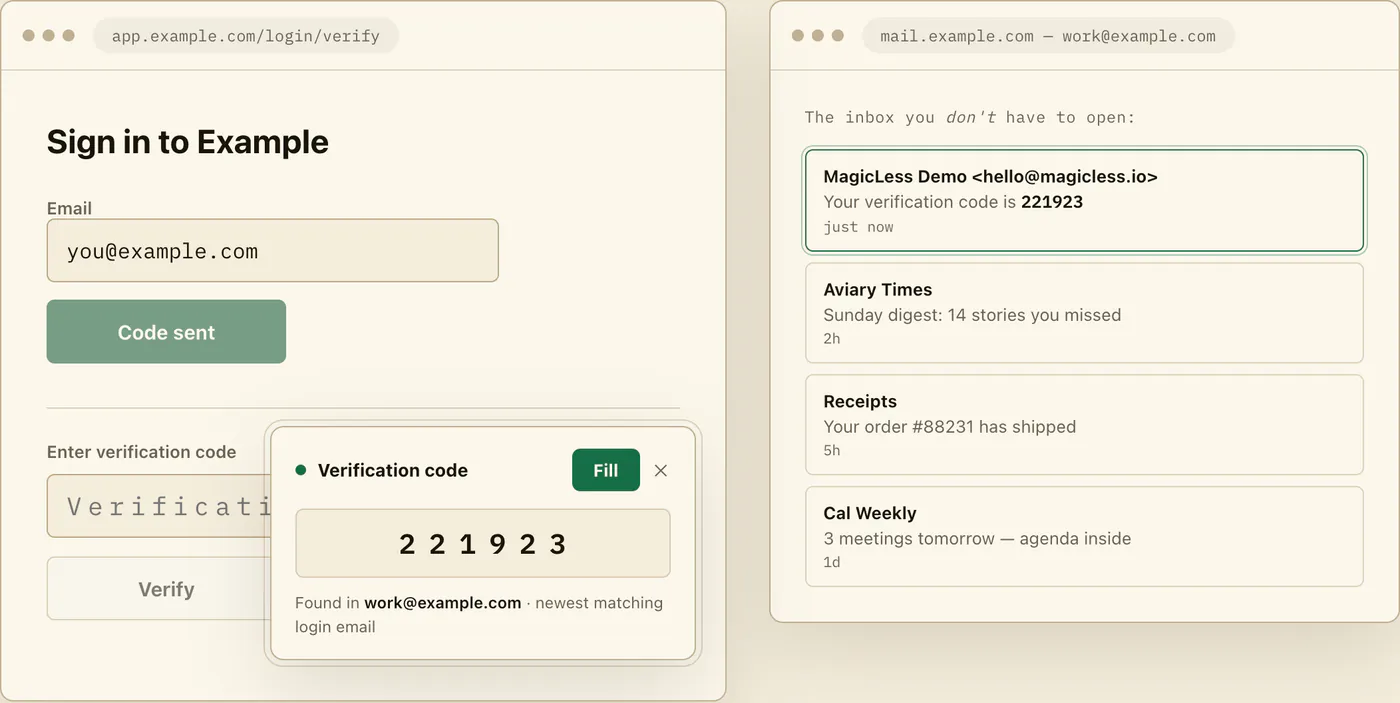
Be clear about what it cannot do on the road: it does not make a delayed email arrive faster or revive a dead SMS channel, it only reads Gmail inboxes you explicitly connect, and it runs in Chrome on the desktop — it will not help on your phone or in other browsers.
FAQ
Why do SMS codes stop working abroad but email codes still arrive?
Texted codes depend on your carrier reaching your number, which usually requires roaming or a travel SIM arrangement. Email travels over any data connection, so it works on hotel Wi-Fi, a local eSIM, or a tethered phone.
Why is my bank suddenly asking extra security questions on this trip?
A sign-in from a new country, network, or device commonly registers as higher risk, and services respond with additional verification. It is protective behavior, not a malfunction — prepare a second step that works abroad rather than trying to suppress the challenge.
Is it safe to receive login codes over hotel Wi-Fi?
Receiving the email is generally fine because modern sites and mail services encrypt traffic in transit. Stay on https:// pages, prefer your own hotspot for financial logins when possible, and never sign in on a shared lobby computer.
Can Gmail offline get me a verification code on a plane?
No — offline mode only makes already-synced mail searchable without a connection. A new code still has to be requested and delivered while you are online, so set offline up for reference mail, not live codes.
Claim ledger
| Claim | Source | Last checked | Confidence |
|---|---|---|---|
| Most websites use encryption that protects information sent over public Wi-Fi networks, per current FTC consumer guidance. | FTC public Wi-Fi advice | 2026-09-13 | High |
| Gmail offline lets you read and search Gmail messages without an internet connection when enabled in Chrome. | Google Gmail offline help | 2026-09-13 | High |
Gmail search supports operators such as from:, is:unread, newer_than:, and OR grouping to narrow results. | Google Gmail search help | 2026-09-13 | High |
| Google Accounts support 2-Step Verification with second-step options beyond a single phone number. | Google 2-Step Verification help | 2026-09-13 | High |
| Sign-ins from new locations or devices can trigger additional verification challenges; exact behavior is provider-specific. | Google 2-Step Verification help | 2026-09-13 | Medium |
Sources
- FTC Consumer Advice - Are public Wi-Fi networks safe?: https://consumer.ftc.gov/articles/are-public-wi-fi-networks-safe-what-you-need-know
- Google Gmail Help - Set up & use Gmail offline: https://support.google.com/mail/answer/1306849?hl=en
- Google Gmail Help - Refine searches in Gmail: https://support.google.com/mail/answer/7190?hl=en
- Google Account Help - Turn on 2-Step Verification: https://support.google.com/accounts/answer/185839?hl=en