Magic Link Opens a Blank Page: What to Check First
A magic link that opens a blank or white page, with no error message, usually means a blocked script or blocked cookie, not an expired or already-used link. Here is what to check.
A magic link that opens a blank or white page, with no expired, invalid, or already-used message anywhere on it, is almost always a browser-rendering problem, not a link-freshness problem. The page's JavaScript likely never finished running or never got the cookie access it needed, most often because of a content or ad blocker, blocked third-party cookies, or a browser privacy mode — try the link once in a clean, unmodified browser window before requesting a new one.
This is a different failure than the ones most magic-link advice covers. An expired or already-used message is the destination page loading fine and telling you something specific; a blank page means the destination never finished loading at all, which points at what ran (or didn't run) in your browser rather than at the link itself.
What causes the blank page? (cause-and-check table)
Usually a blocked script or cookie, not a broken link. Open the link in a private window with extensions off; if it loads there, an extension or cookie setting is the cause.
| Likely cause | How to check | Fix |
|---|---|---|
| Ad blocker or privacy extension blocked a script the page needs | Open the same link in a private/incognito window with extensions off | If it loads there, the extension was the cause; add a site exception or use that window for this login |
| Third-party cookies blocked | Check your browser's cookie settings for the site | Chrome, Firefox, Safari, and Edge all differ here — see the browser-specific notes below |
| Strict tracking-prevention mode | Check whether "Enhanced" or "Strict" tracking protection is on for this site | Temporarily allow the site, or use the clean-window test above |
| JavaScript disabled or blocked by a corporate proxy | Try the link on a different network or unmanaged device | If it works elsewhere, this is a network/device policy, not the link |
| The link is genuinely expired or already used, and the destination page itself is just broken at showing that message | Try requesting one fresh link and clicking it immediately | If a brand-new link also renders blank, the page itself likely has the rendering bug, not your browser |
- I tried the link in a fresh private/incognito window with no extensions active.
- I checked whether third-party cookies are blocked for this site specifically.
- I tried a different browser entirely, not just a different window.
- I confirmed the blank page shows no error text at all, as opposed to an expired/already-used message.
- I only requested a new link after ruling out my own browser as the cause.
Why do blocked cookies cause a blank page?
Magic-link sign-in pages are often small web apps that need to read or set a cookie to complete the handoff from "you clicked a link" to "you are signed in." MDN's documentation on third-party cookies describes how modern browsers increasingly restrict or block them by default, and specifically calls out that this breaks cross-site sign-in flows where a shared authentication domain sets a session cookie for other sites to read. When that cookie access is blocked, the page's script can fail silently rather than showing a clear error — which is exactly what a blank page looks like from the outside. MDN also notes the technical fix on the provider's side is typically setting SameSite=None; Secure on that cookie, which is outside your control as the person clicking the link.
Does your browser block the cookie by default?
Whether third-party cookies are blocked by default depends heavily on which browser you're using — this is not one universal setting. Chrome's own help center documents how to check and change third-party cookie blocking under Privacy and security settings, which matters because Chrome's defaults have differed from Safari's and Firefox's more aggressive tracking-prevention defaults. If a magic link works in one browser and goes blank in another, a cookie-policy difference between those browsers is the most likely reason, not the link itself.
How do you test before you change settings?
The fastest diagnostic is not changing a setting — it's opening the same link in a brand-new private/incognito window with no extensions loaded, since most browsers disable extensions there by default. If the page renders normally, you've isolated the cause to something in your regular browser profile (an extension, a cookie exception, or a tracking-prevention rule) without having to guess which one. If it still renders blank in a clean window, the problem is more likely the destination page itself or your network.
How is this different from an expired or used link?
If your link instead shows explicit text like expired, invalid, or already used, that is a freshness or one-time-use issue with a completely different fix — see magic link email not working: check these things before you start over for that decision tree. If the failure specifically says "already used" the instant you click a brand-new link, especially on a work address, that has its own distinct cause — see magic link already used: your email security scanner probably clicked it first. Auth0's passwordless best-practices documentation notes that email clients and browser environments introduce operational constraints outside a provider's direct control, which is the general category both the blank-page problem and the scanner problem fall into.
Where does MagicLess fit?
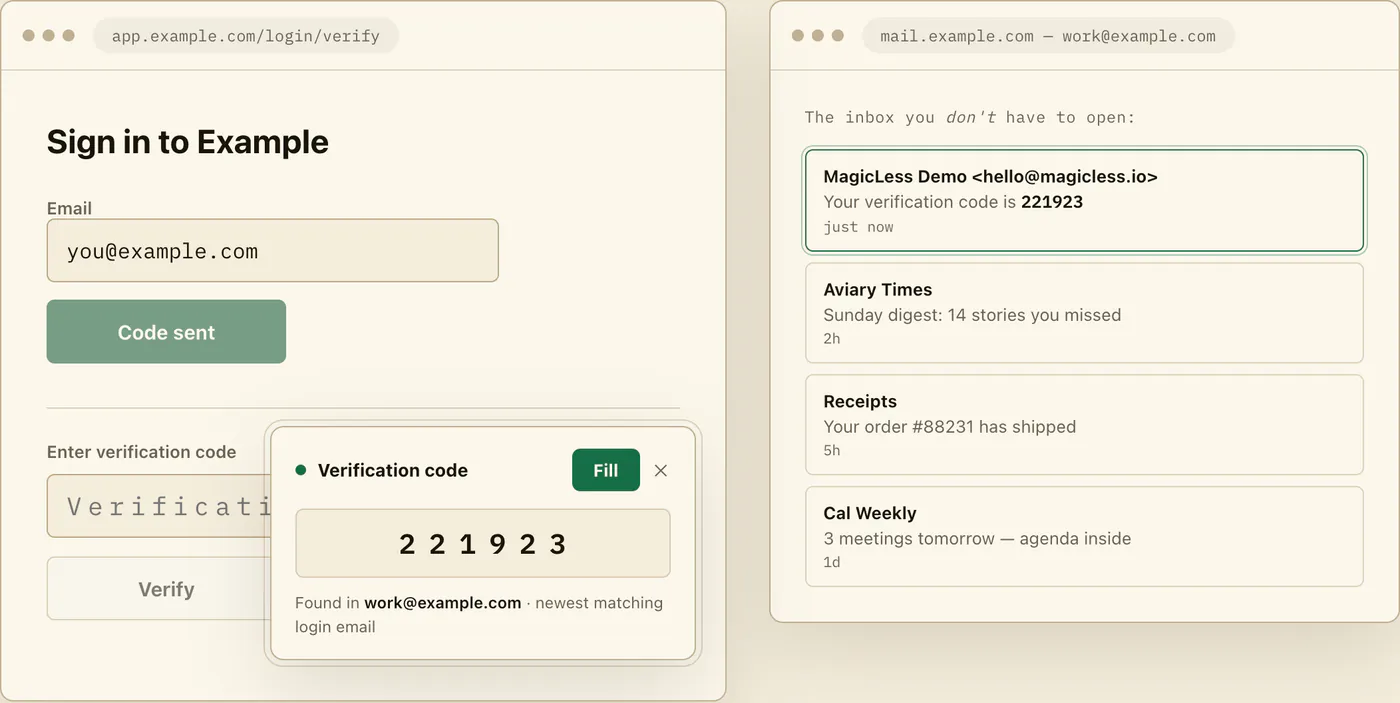
MagicLess cannot fix a page that fails to render — that's a browser or network problem, not an inbox-reading one, and nothing about connecting Gmail changes what your browser blocks. What it can do is hand you a fallback: if the same login email included, or the service also offers, a numeric code alongside the magic link, MagicLess surfaces that code from your connected Gmail inbox so you're not stuck waiting on a page that will not load. A blank page is a browser-rendering problem MagicLess cannot fix from the inbox side, but it can hand you the newest matching code from a connected Gmail account as an immediate fallback while you sort the browser out.
FAQ
Why does my magic link open a completely blank page instead of an error?
Most often a script the page needs was blocked by an ad blocker, extension, or cookie restriction, so the page never finishes rendering far enough to show any message at all, blank or otherwise.
Is a blank page the same problem as "link expired" or "already used"?
No. Those are the destination page loading correctly and telling you something specific. A blank page means the destination did not finish loading, which points to your browser or network, not the link's freshness.
Which browser setting should I check first?
Start by testing in a private/incognito window with extensions off. If that fixes it, the cause was in your regular browser profile; only then dig into specific cookie or tracking-prevention settings.
Should I just request a new magic link if the page is blank?
Only after testing in a clean browser window. A new link will render exactly as blank as the old one if the cause is your browser, not the link's freshness.
Does this happen more on work or school networks?
It can. Corporate proxies and managed-device policies sometimes restrict scripts or cookies more aggressively than a personal browser would, which is worth testing on an unmanaged device or network if you have one available.
Claim ledger
| Claim | Source | Last checked | Confidence |
|---|---|---|---|
| Browsers increasingly block or restrict third-party cookies by default, which can break cross-site sign-in flows that depend on a shared authentication-domain cookie. | MDN: Third-party cookies | 2026-09-16 | High |
| The documented technical mitigation for cross-site cookie blocking is setting SameSite=None with Secure on the relevant cookie, which is provider-side, not user-side. | MDN: Third-party cookies | 2026-09-16 | Medium |
| Chrome documents how users can check and change third-party cookie blocking under Privacy and security settings. | Google Chrome Help: Delete, allow, and manage cookies in Chrome | 2026-09-16 | High |
| Auth0 documents that email clients and browser environments introduce operational constraints on passwordless flows outside the identity provider's direct control. | Auth0 Docs: Passwordless best practices | 2026-09-16 | Medium |
Sources
- MDN Web Docs: Third-party cookies
- Google Chrome Help: Delete, allow, and manage cookies in Chrome
- Auth0 Docs: Passwordless best practices