Apple Mail Moved Your Code to Junk: What to Check First
Find a verification code that Apple Mail or iCloud Mail filed as Junk on iPhone, Mac, or iCloud.com, and stop the sender from being junked again.
Apple Mail's on-device junk filter, not a delivery failure, is the usual reason a verification code never reaches your iCloud inbox. Open the Junk folder on iCloud.com or in Mail, find the message, move it to Inbox with the Not Junk action, and the sender should stop being filtered going forward. Do that before requesting a second code, because a second code just lands in the same Junk folder.
This is not an outage. Apple's own account-recovery help page for missing verification or password-reset email names a spam filter or mail rule as a likely cause and tells you to search Spam, Junk, Trash, Deleted Items, and Archive before assuming the email never sent.
Where is the code on each device? (Junk-recovery table)
In the Junk mailbox of your iCloud Mail. Open Junk, select the code, and choose Move to Inbox; Apple says later messages from that sender then stop going to Junk.
| Where you are | How to reach Junk | How to restore the message |
|---|---|---|
| iPhone or iPad, via icloud.com/mail | Sign in at icloud.com/mail, open the Mailboxes list, select Junk | Tap Edit, tap the circle beside the message, tap Mark, choose Move to Inbox |
| Mac or Windows, via icloud.com/mail | Sign in at icloud.com/mail, click Junk in the sidebar | Click the message (Command-click for more than one on Mac, Control-click on Windows), click Mark or More, choose Move to Inbox |
| Mac Mail app | Click Junk in the mailbox sidebar | Select the message and click Junk in the toolbar again, or drag it to Inbox |
| iPhone or iPad Mail app | Open the Junk mailbox for the account | Open the message, tap Move to Folder, tap Inbox |
- I checked Junk on the device I actually use for this login, not a different one.
- I moved the message to Inbox with Not Junk or Move to Inbox, not just read it in place.
- I confirmed it is the newest code for this attempt before entering it on the login page.
- I checked that email.apple.com or the service's real sending address is allowed in my mail settings.
- I know Junk empties on its own, so I did not wait past today to look.
Why does Apple's filter catch a code on the first email?
Apple's iCloud Mail guide describes Junk as a folder the system files suspected spam into automatically, and it treats an unfamiliar sender differently from one you have already exchanged mail with. A verification-code sender you have never received mail from before, or one whose address changes between sends, reads to the filter like any other unknown sender. Once you restore one message from that address, Apple's own guide states subsequent mail from the same sender will no longer be marked as Junk, which is the mechanism that fixes this for future codes without you touching a setting.
How long does a code stay in Junk?
Apple's iCloud Mail guide is explicit that junked mail does not sit there forever: messages in the Junk folder are automatically deleted after 30 days. A code you do not need today but expect to need again, from a service you use monthly instead of daily, can be gone by the time you look for it next. If you know a sender routinely lands in Junk, check that folder proactively before the deletion window closes rather than only when a login is blocking you.
How do you stop the next code from going to Junk?
Restoring one message trains the filter for that sender, per Apple's own documentation, so the fastest durable fix is deliberately restoring the very first Junk-filed code you get from a new login service rather than clicking past it. If codes from the same service keep landing in Junk anyway, check whether your email address settings block the sender's domain outright — Apple's account-help page notes you may need to allow messages from email.apple.com specifically for Apple's own account mail, and the same idea applies to any other service: an explicit block or rule outranks the learned-sender behavior.
What if the code is not in Junk at all?
If Junk is empty and the code still has not arrived, the cause has moved from filtering to delivery or addressing. Confirm you are checking the Apple Account email you actually registered with this service — Apple's guide points to checking every address associated with the account for a password-reset or verification email — and that you have not exceeded a resend window. If you are troubleshooting a completely different mail provider's spam handling, the mechanics differ enough to need its own walkthrough: see why Outlook holds codes in Junk and three other places first or checking a Gmail Spam folder without getting phished.
Where does MagicLess fit?
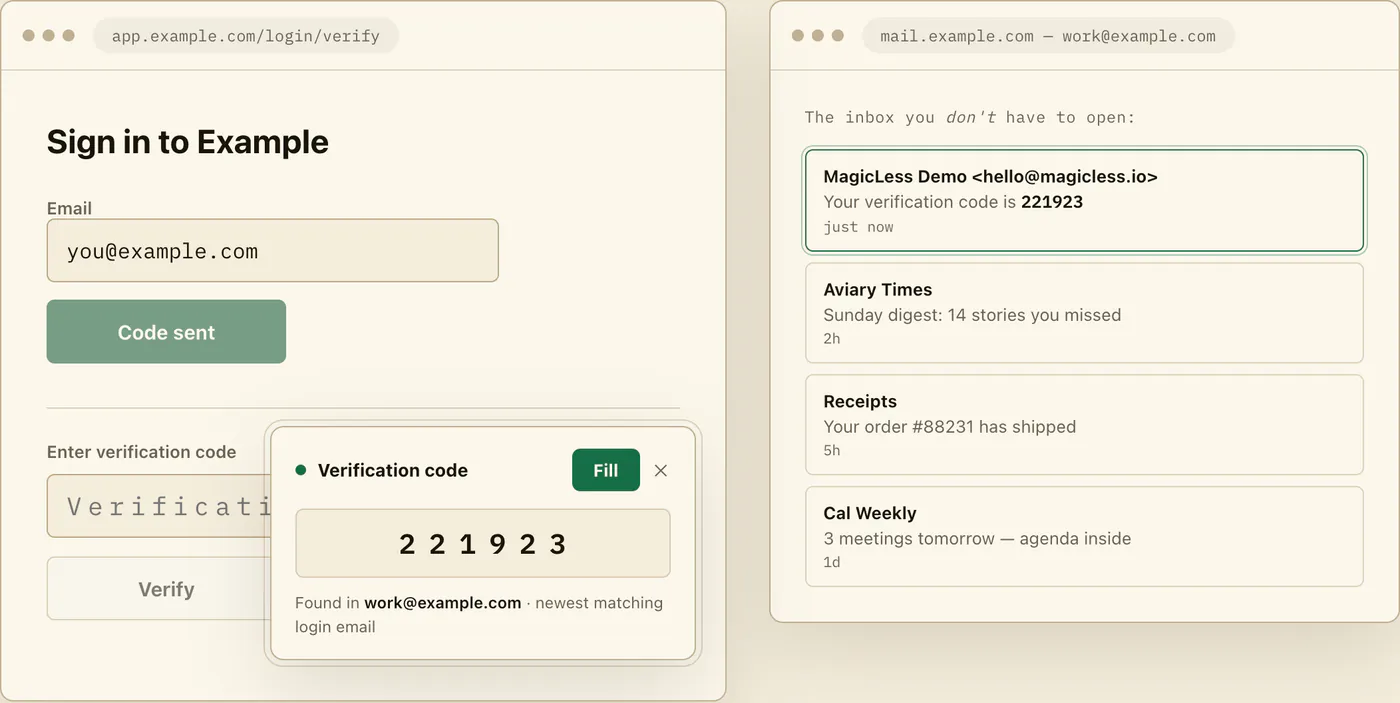
MagicLess does not reach into iCloud Mail — it connects to Gmail inboxes you choose to link, and reads the newest matching code there. Plenty of people forward or alias Apple-adjacent accounts, or simply run their day-to-day logins through Gmail while keeping Apple Mail for personal use, and for those logins MagicLess removes the Junk-folder detour entirely by surfacing the code on the page that asked for it. MagicLess reads the connected Gmail inboxes people forward their Apple codes through and surfaces the newest one on the page, so a fresh trip into Junk on a phone screen stops being the fallback plan. For a code that lives only in iCloud Mail, the device table above is still the fastest path.
FAQ
Why does Apple Mail send a brand-new verification code to Junk?
Apple's iCloud Mail filtering treats mail from a sender you have no history with as suspect by default, and a one-time-code sender often looks unfamiliar on the very first message.
Does moving one code to Inbox fix future codes from the same sender?
Yes. Apple's guide states that once you mark a message as not junk, later mail from that sender is not filed into Junk again.
How long do I have before a junked code disappears for good?
Apple's guide states Junk folder messages are deleted automatically after 30 days, so check it before that window closes if you expect to need the sender again.
I checked Junk and it's empty. What now?
Confirm you are checking the exact Apple Account address registered for this login, then check Spam, Trash, and Archive as Apple's own recovery guide suggests, before requesting a new code.
Should I turn off Apple's junk filtering to stop this happening?
No. CISA's guidance recommends keeping multifactor protections and mail filtering intact rather than weakening account security tooling to save a few taps; restoring the specific sender is the targeted fix.
Claim ledger
| Claim | Source | Last checked | Confidence |
|---|---|---|---|
| iCloud Mail's Junk folder deletes messages automatically after 30 days. | Apple: Manage junk mail in Mail on iCloud.com | 2026-09-16 | High |
| Restoring a message from Junk stops future mail from that sender being marked junk. | Apple: Manage junk mail in Mail on iCloud.com | 2026-09-16 | High |
| Missing Apple Account verification or reset email is commonly explained by a spam filter or rule moving it to Spam, Junk, Trash, Deleted Items, or Archive. | Apple: If you didn't receive your Apple Account verification or password reset email | 2026-09-16 | High |
| CISA recommends turning on and keeping multifactor authentication protections rather than disabling them for convenience. | CISA: Turn on multifactor authentication | 2026-09-16 | High |
Sources
- Apple Support: Manage junk mail in Mail on iCloud.com
- Apple Support: If you didn't receive your Apple Account verification or password reset email
- Apple Support: Report and reduce spam in iCloud Mail
- CISA: Turn on multifactor authentication