Team 2FA Code Sharing Tools Compared by Price
Six dedicated tools to share 2FA codes with a team, compared on SMS, email, and TOTP support, delivery channel, and starting price, re-checked September 16, 2026 — plus when a shared Gmail inbox is enough instead.
If you want to share 2FA codes with a team tool rather than passing codes around in Slack DMs or a group chat, there are at least six dedicated products built for exactly that, and their pricing and code-type coverage vary more than you'd guess. This guide re-fetched every pricing page on September 16, 2026 and lays out what each one actually covers — SMS, email, TOTP, or some mix — against what it costs, so you can tell which tool matches the codes your team actually receives before you pay for one that doesn't.
Prices for tools like these change without much notice, so treat every figure below as a snapshot from the date above, not a permanent quote, and re-check the vendor's own pricing page before you commit.
Which tools actually share 2FA codes for teams, and what do they cost?
Team 2FA code tool pricing table, current as of September 16, 2026:
| Tool | SMS | Email codes | TOTP | Delivery | Starting price | Source |
|---|---|---|---|---|---|---|
| AuthUnity | Yes, shared SMS number | Yes, forwarding address for email codes | Yes, unlimited TOTP sources | Web app, codes shown in real time with a countdown | $25/mo, one plan, up to 10 members | authunity.com |
| ShareTeamCodes | Profile at $10/mo per phone number | Profile at $5/mo per email address | Profile at $2/mo per authenticator | Slack (Starter); Slack + Teams (Team) | $49/mo (Starter, up to 5 profiles) | shareteamcodes.com/pricing |
| GroupFactor | Yes, dedicated phone number | Not mentioned | Yes | In-app, Slack notifications, SMS forwarding to personal phones | $25/mo, or $20.83/team/mo billed annually (Business); free for members who only join teams | groupfactor.io |
| MultiMFA | Yes, shared MultiMFA number | No inbound email codes; codes can be relayed to users by SMS or email | Separate Authenticator product, $5/user/mo | SMS or email relay; SMS & email notification options on Organization plan | $5/mo (Basic SMS, 2 users) | multimfa.com/pricing |
| Daito | Add-on, $49/mo per number | Not mentioned | Yes, unlimited 2FA tokens on every plan | Not detailed on pricing page | $190/yr (Basic, 3 users, shown as $15.83/mo) | daito.io/pricing |
| Group2FA | Yes, from the $3.99/mo Basic number plan | Not mentioned | Yes, separate Authenticator Code Group plan | Not detailed on pricing page; number plans include SMS or WhatsApp message allowances | $1.69/mo (Authenticator Code Group, 5 members) or $3.99/mo (Basic number, 3 members) | group2fa.app |
| Team SMS | Unavailable | Unavailable | Unavailable | Unavailable | Not available during outage | teamsms.io |
Team SMS's site shows an outage notice: its phone provider updated its API without prior notice, which disrupted the SMS service, and the company expects service back "within the next 48 hours." The notice has no date, and it was also there on an earlier check the same day, so treat Team SMS as unavailable until the notice is gone.
Which tools actually handle email codes, not just SMS and TOTP?
Only two of the six live products take in codes that arrive by email: AuthUnity, which gives you a forwarding address for email codes next to its shared SMS number and TOTP sources, and ShareTeamCodes, which sells email profiles at $5 per address per month. GroupFactor, Daito, and Group2FA do not mention email codes on the pages checked for this guide. MultiMFA is easy to misread: its page does mention email, but as a way to relay SMS codes to your users and as a notification option on the Organization plan, not as a way to receive codes that a service emails you. If your team's problem is emailed codes rather than texted ones, the realistic list is AuthUnity or ShareTeamCodes.
How does AuthUnity vs ShareTeamCodes actually compare on price?
AuthUnity vs ShareTeamCodes is the closest head-to-head in this list because both cover SMS, email, and TOTP. AuthUnity is a single flat plan: $25 per month for up to 10 team members, with a shared SMS number, unlimited TOTP sources, and a forwarding address for email codes, plus what its site calls "a complete audit trail" that is exportable and "AI-powered source classification" of incoming codes. ShareTeamCodes starts higher, at $49 per month for its Starter plan with up to 5 profiles and Slack, and goes up to a $149-per-month Team plan with up to 25 profiles and Slack plus Teams; its pricing page lists profile prices of $10 per phone number, $5 per email address, and $2 per authenticator per month. For a small team that wants all three code types bundled without add-on math, AuthUnity's flat price is simpler; for a larger team that wants Slack or Teams delivery built into the base plan and is fine paying per profile, ShareTeamCodes' tiers are built for that.
What does each tool actually deliver codes through?
Delivery channel is where these products diverge as much as pricing does. AuthUnity shows codes in its web app in real time, and neither AuthUnity nor Daito mentions Slack or Teams on the pages checked. ShareTeamCodes is the only one of the six that lists both Slack and Teams, depending on the plan. GroupFactor posts codes to Slack, forwards SMS to members' own phones, and also offers a Model Context Protocol (MCP) server so AI agents can fetch codes, which none of the other five mention. MultiMFA relays codes to users by SMS or email. If Slack or Teams delivery is a requirement, look at ShareTeamCodes first, or GroupFactor if Slack alone is enough and you do not need email codes.
When is a paid team 2FA tool actually worth it?
A dedicated tool earns its price when the team needs at least one of three things that a shared inbox and personal browser extensions genuinely cannot provide on their own: a real shared phone number for SMS codes, since no browser extension can receive a text message; an audit log showing who accessed which code and when, which matters once more than a couple of people touch shared logins; or seat-based member management so people can be added and removed from access without reissuing credentials. AuthUnity's audit trail and per-source permissions, ShareTeamCodes' audit logs by plan, and GroupFactor's team-based member access are all built around that need. If your team's shared logins live behind SMS-only two-factor, or you need to prove after the fact who used a shared code, that's the signal to pay for one of these rather than improvise.
When is a shared Gmail inbox enough instead?
When every account in question uses email codes, sits behind a small trusted team, and doesn't need an audit trail beyond "someone on the team handled it," a shared Gmail inbox plus each person's own browser extension covers the same ground without a monthly line item. That workflow, and the access-control questions worth answering before you set one up, is covered in shared Gmail inbox for verification codes: a safer team workflow; the broader security tradeoffs of passing codes around a team at all, including what NOT to do, are in the safe way to share a login code with your team without creating a security mess. Neither of those guides is repeated here — read them directly for the workflow steps.
Where does MagicLess fit?
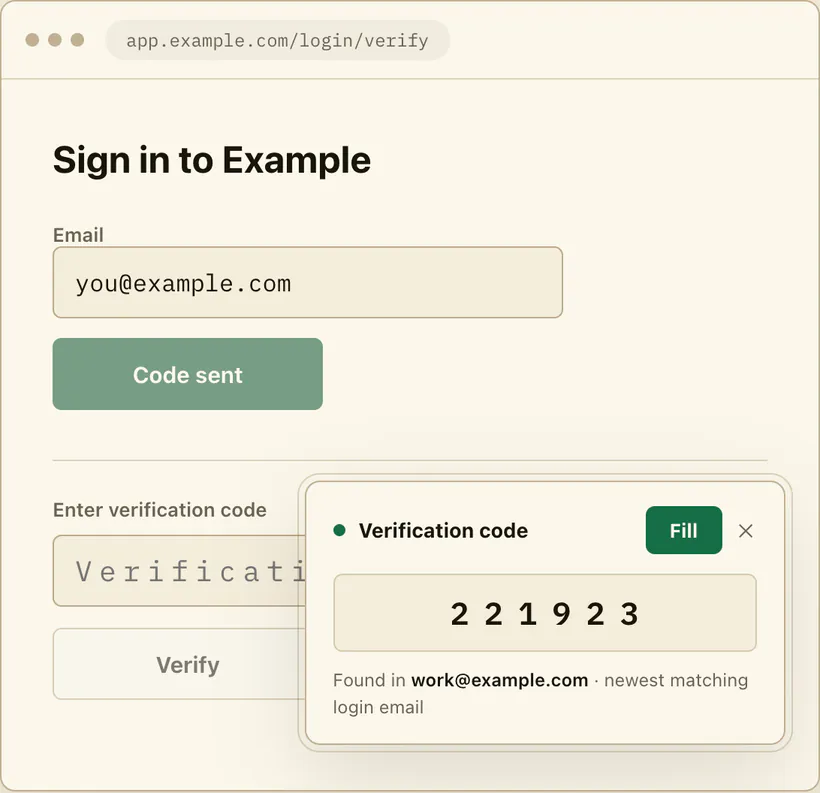
MagicLess is not a team tool and was never built to be one: it has no audit log, no SMS delivery, and no seat or member management, so if any of those three things is what the team actually needs, a tool from the table above fits better than trying to stretch a personal extension to cover it. What MagicLess actually is: a free Chrome extension that connects to a Gmail inbox you personally authorize (up to five inboxes) and surfaces an arriving code or magic link on the page that asked for it, with the Gmail lookup running server-side through Composio. In a shared-inbox setup, each team member with access to that shared Gmail account could run their own copy of MagicLess against it, but that is a workaround built on a personal tool, not a team feature MagicLess offers — there's no shared dashboard, no per-member permission tier, and no record of who filled which code. If a comparison of extensions in this exact category, including how a server-side design like MagicLess's differs from a local-only one, is useful context before you decide between "shared inbox plus extension" and "paid team tool," see MagicLess vs. InboxKey: server-side Gmail or a local IMAP bridge.
FAQ
Which team 2FA tool supports email codes, not just SMS or TOTP?
Of the six live tools compared here, AuthUnity (a forwarding address for email codes) and ShareTeamCodes (email profiles at $5 per address per month) take in emailed codes, as of September 16, 2026. MultiMFA uses email only to relay codes and send notifications. GroupFactor, Daito, and Group2FA do not mention email codes on their pages.
What is the cheapest way to share 2FA codes with a team?
Among the paid tools compared here, Group2FA's Authenticator Code Group plan at $1.69 per month for 5 invited members is the lowest listed price, but it covers authenticator codes only, not SMS or email. For a shared SMS number, Group2FA's Basic plan at $3.99 per month (3 members) is the cheapest listed, followed by MultiMFA's Basic plan at $5 per month (2 users).
Is Team SMS still down?
On September 16, 2026, teamsms.io showed an outage notice that blames an unannounced API change by its phone provider and says it expects service back within 48 hours. The notice has no date, so check the site directly before you assume it's back.
Does AuthUnity or ShareTeamCodes include an audit log?
AuthUnity's site describes "a complete audit trail" of code views and permission changes, and says it is exportable. ShareTeamCodes documents audit logs by tier, described as "basic" on the Starter plan and "advanced" on the Team plan, per its pricing page.
Is MagicLess a good fit for sharing codes across a team?
Not as a team product — it has no shared dashboard, audit log, or per-seat controls. It's a personal Chrome extension each person would run against a Gmail account they can access; for an actual team tool, use one of the dedicated products in the table above.
Claim ledger
| Claim | Source | Last checked | Confidence |
|---|---|---|---|
| AuthUnity's single plan is $25/month for up to 10 members with a shared SMS number, unlimited TOTP sources, a forwarding address for email codes, and an exportable audit trail. | authunity.com | 2026-09-16 | High |
| ShareTeamCodes' Starter plan is $49/month (up to 5 profiles, Slack, basic audit logs) and Team is $149/month (up to 25 profiles, Slack + Teams, advanced audit logs); profiles are priced at $10 per phone number, $5 per email address, and $2 per authenticator per month. | shareteamcodes.com/pricing | 2026-09-16 | High |
| GroupFactor's Business plan is $20.83/team/month billed annually or $25/month, with a dedicated number, SMS and TOTP codes, Slack notifications, and SMS forwarding; its page does not mention email codes. | groupfactor.io | 2026-09-16 | High |
| MultiMFA's Basic SMS plan is $5/month for 2 users; relay users receive codes by SMS or email; SMS & email notification options are on the Organization plan ($20–$50/month); MultiMFA Authenticator is $5/user/month. | multimfa.com/pricing | 2026-09-16 | High |
| Daito's Basic plan is $190/year for 3 users with unlimited 2FA tokens; SMS is a $49/month per-number add-on; the pricing page does not mention email codes. | daito.io/pricing | 2026-09-16 | High |
| Group2FA's cheapest plans are $1.69/month (Authenticator Code Group, 5 members) and $3.99/month (Basic US number, 3 members, SMS or WhatsApp message allowance); the page does not mention email codes. | group2fa.app | 2026-09-16 | High |
| Team SMS's website shows an outage notice blaming an unannounced phone-provider API change and expecting service back within 48 hours. | teamsms.io | 2026-09-16 | High |
Sources
- AuthUnity: authunity.com
- ShareTeamCodes pricing: shareteamcodes.com/pricing
- GroupFactor: groupfactor.io
- MultiMFA pricing: multimfa.com/pricing
- Daito pricing: daito.io/pricing
- Group2FA: group2fa.app
- Team SMS: teamsms.io