The code arrived, but the login rejects it
Both a Code and a Magic Link Arrived: Choose the Right One
When one login email contains both a 6-digit code and a magic link, decide which to use based on your device, your inbox security, and what you clicked already.
Some login emails give you both a clickable link and a typed code so you are not stuck if one fails — they are usually two doors into the same attempt, not two separate logins. Pick one, based on where you are reading the email versus where you started the login, and stop there; do not click the link and then also type the code, because using one can invalidate the other before you get to try it.
Neither option is inherently the "real" one. Services that send both are deliberately offering a fallback, and Auth0's own passwordless documentation describes magic links and one-time codes as separate authentication methods a provider can offer side by side, not a primary-plus-backup pair.
Should you use the code or the link? (decision table)
Use the link when you read the email in the same browser where you started signing in; use the code when you read it on a different device.
| Your situation | Use | Why |
|---|---|---|
| You are reading the email on the same device and browser where you started logging in | Either works; the link is one click faster | No handoff between devices needed |
| You are reading the email on your phone but signing in on a laptop | The code | Typing six digits crosses devices cleanly; a link opened on your phone logs in your phone's browser, not your laptop's |
| Your email address is a work or school account behind a security scanner | The code | Corporate link scanners can silently open and consume single-use links before you click, more detail in why your email scanner clicks magic links first |
| You are on a shared or public computer | The code | A code typed and used leaves less standing session state than a clicked link that stays valid if you walk away |
| You already clicked the link and it worked | Ignore the code | The attempt is already complete; a leftover code from the same email has nothing left to authenticate |
| The link failed or says already used | Try the code from the same email | If it is genuinely fresh, it may still be valid even though the link was consumed — but request a new one if it also fails |
- I picked one path, code or link, before touching either.
- I matched my choice to the device gap, if there is one, between where I read the email and where I started signing in.
- I did not click the link and then also type the code from the same message.
- If my address is a work or school account, I defaulted to the code.
- If the first path failed, I tried the other from the same email before requesting a new one.
Why can using one break the other?
A magic link and a one-time code sent together typically both authenticate the same underlying sign-in attempt. Auth0's documentation on passwordless authentication and its best-practices guidance both describe these as implementation-specific flows where the provider controls exactly how a session resolves once any one credential in an attempt is used. In practice that means completing sign-in via the link can retire the whole attempt, code included, and vice versa — so clicking the link "just to see" and then also typing the code is how people end up with a rejected code that looked perfectly valid five seconds earlier.
How does corporate mail security change the choice?
If your address sits behind a scanner like Microsoft's Safe Links, Microsoft's own documentation describes URL scanning and time-of-click verification of links in inbound mail. Microsoft's page does not say that Safe Links uses up single-use links, but any security tool that opens a link to check it can spend a one-time link before you click it. When both a code and a link are offered on a scanned mailbox, the code avoids that risk, because there is no link for a scanner to open. On a personal, unscanned address this risk mostly does not apply, and either option is reasonable.
When does the safer choice actually matter?
OWASP's authentication guidance frames one-time credentials, whether delivered as a link or a code, as short-lived secrets that should be used once and not shared. Neither format is more secure than the other in isolation — the safer choice is situational: the one that survives your specific device handoff and mail-security setup without extra clicks, retries, or forwarding. If you are comparing magic links and codes as a general design choice rather than a one-off decision, see magic link vs OTP: which login flow creates less friction. If several separate code emails have piled up instead of one email with both options, that is a different problem — see multiple OTP emails: which code should you use.
Where does MagicLess fit?
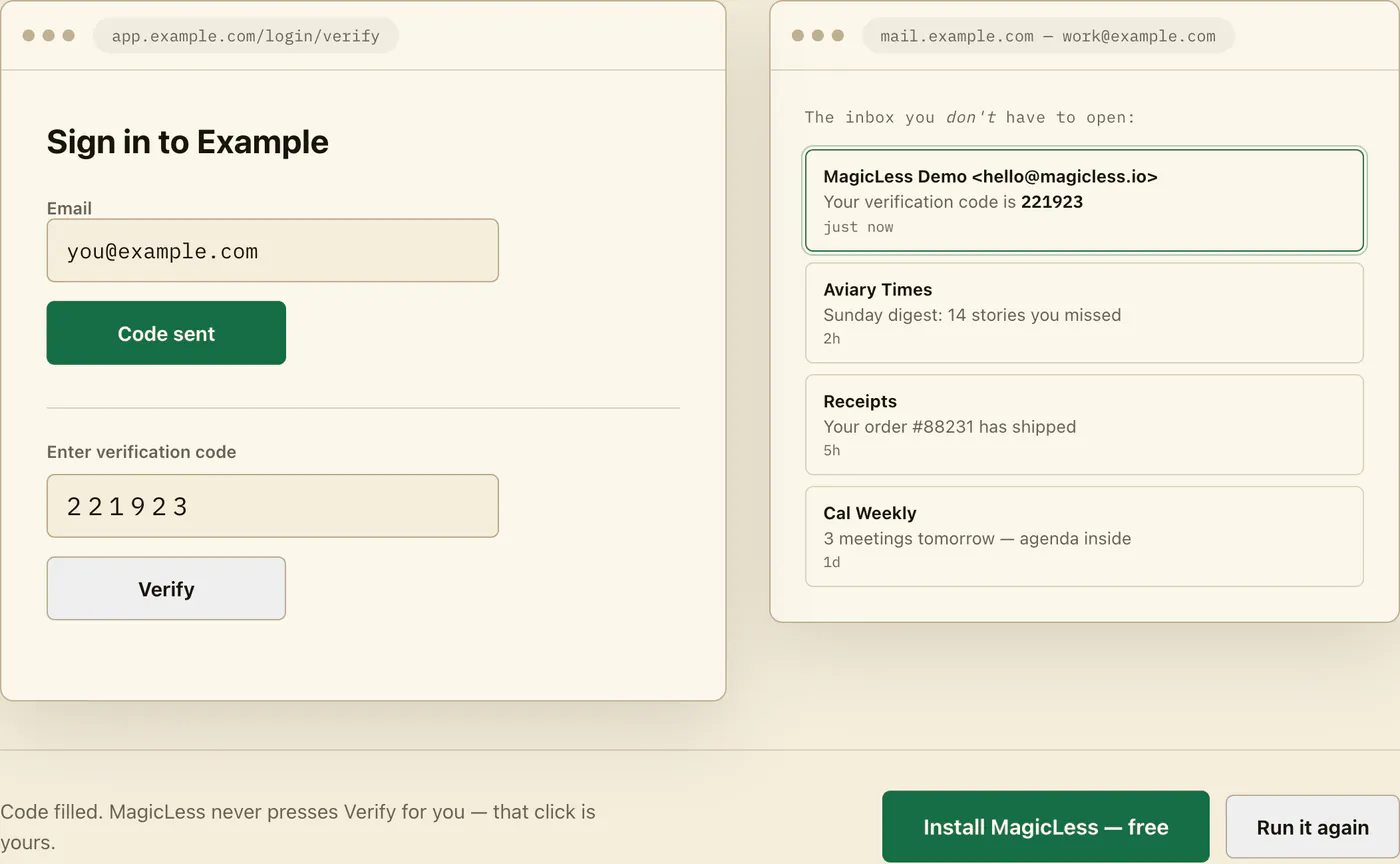
MagicLess does not decide between a link and a code for you, and it cannot make either one more secure than the provider built it to be. What it removes is the extra scrolling and re-reading: on a connected Gmail inbox, it reads the newest matching code out of the email and places it on the page, so you are not weighing device handoff or scanner risk under time pressure. MagicLess reads the code out of the same email and places it on the page, so on a connected Gmail inbox you are not scrolling past a link deciding which half of the email to trust. If you would rather click the link, that choice is still entirely yours to make.
FAQ
Does it matter which one I use if I'm on one device the whole time?
Not much. If you are reading the email on the same device and browser where the login started, either the link or the code should complete the same attempt.
Can I try the link, and if it fails, use the code from the same email?
Often yes, if the code is still fresh — try it. But do not use both when the first one already succeeded; a successful sign-in usually retires the rest of that attempt.
Why did my code stop working right after I clicked the link?
The link likely completed the sign-in attempt already, which can invalidate the code from the same message. This is expected provider behavior, not a bug on your end.
Is the code safer than the link, or the other way around?
Neither is inherently safer. The code is more resistant to corporate link-scanning tools consuming it before you click; the link is faster when there is no device handoff and no scanner involved.
Should I forward the email so a teammate can pick whichever one works?
No. Both the code and the link are one-time credentials for your specific sign-in attempt; forwarding either one moves a login secret outside the account holder's control.
Claim ledger
| Claim | Source | Last checked | Confidence |
|---|---|---|---|
| Auth0 documents magic links and email-delivered one-time codes as separate passwordless authentication methods a provider can implement. | Auth0 Docs: Passwordless authentication with magic links | 2026-09-16 | High |
| Passwordless flow behavior, including how one credential in an attempt affects another, is implementation-specific and governed by the provider's own configuration. | Auth0 Docs: Passwordless best practices | 2026-09-16 | Medium |
| Microsoft Defender for Office 365 Safe Links performs URL scanning and time-of-click verification on inbound email links, which can consume single-use links before a user clicks them. | Microsoft Learn: Safe Links in Microsoft Defender for Office 365 | 2026-09-16 | High |
| OWASP's authentication guidance treats one-time credentials as short-lived secrets meant for single use regardless of delivery format. | OWASP Cheat Sheet Series: Authentication | 2026-09-16 | Medium |
Sources
- Auth0 Docs: Authenticate users with passwordless email magic links
- Auth0 Docs: Passwordless best practices
- Microsoft Learn: Safe Links in Microsoft Defender for Office 365
- OWASP Cheat Sheet Series: Authentication