The code arrived, but the login rejects it
Verification Code at Checkout? Beat the Cart Timer
Identify which inbox the store used, paste one ready-made Gmail search, and check Promotions before the cart timer expires — without spamming resend.
A cart timer plus an email verification prompt is a race with three legs: figure out which inbox the store emailed, jump to that inbox, and pull the newest code before the hold releases. Run them in that order. The store almost always tells you where it sent the code — a masked hint like n•••@g•••.com on the prompt, or the address sitting in the checkout's email field — so read that first instead of opening both of your inboxes on instinct. Then paste a prepared Gmail search rather than scrolling, and check Promotions before you touch resend. Everything below is ordered by seconds spent, because during a ticket drop or flash sale that is the only metric that matters.
Leg one: read the page before you leave it
The slowest checkout failure is searching the wrong inbox for a code that landed in the other one. Before switching tabs, extract two clues from the checkout page itself:
- The masked address on the verification prompt. Even
j•••@w•••.comversusj•••@g•••.comsettles the personal-versus-work question instantly. - The email field earlier in the checkout flow. If the browser autofilled it, that autofill tells you which identity this store knows.
If the store account predates your current job, assume personal. If the order is a work expense, assume work. Ten seconds of inference here routinely saves a full minute of searching the wrong mailbox.
Leg two: paste this search, don't scroll
Keep a search ready to paste. In Gmail, this pulls fresh verification mail out of a busy inbox in one keystroke sequence:
| Situation | Paste into Gmail | Notes |
|---|---|---|
| You know the store | from:storename newer_than:1h | Replace storename with the merchant or its domain |
| You don't remember the sender | newer_than:1h (code OR verify OR verification) | Catches most verification subject lines from the last hour |
| The inbox is drowning in sale mail | in:anywhere newer_than:1h verification | in:anywhere includes Spam and Trash in one pass |
| Two codes arrived | newer_than:1h from:storename then open the newest | The latest request usually supersedes earlier ones |
Take the newest matching message every time. If two codes from the same store are sitting there, the earlier one likely died when you requested the second — entering it burns an attempt and more clock. When duplicates have already piled up, the multiple-OTP triage covers how to pick, and the code-matching guide helps when codes from similar-sounding senders are mixed together.
Leg three: check the tab Gmail filed it under
Store emails are exactly the species Gmail's inbox categories were built to sweep out of Primary. A merchant's verification message can inherit the sender's usual filing and land under Promotions or Updates, where no notification badge draws your eye. If your inbox shows category tabs, click Promotions and Updates before concluding the email never came — or let the in:anywhere search above cover all of it in one shot. There is a dedicated walkthrough in what to search before you resend from Promotions.
The two-inbox problem, solved before the next sale
If every checkout turns into a guessing game between two Gmail accounts, fix the structure once:
- Add your second account inside the same Gmail interface on your computer, so switching inboxes is one avatar click instead of a separate login. Google documents adding another account on desktop Gmail, and the accounts stay independently signed in side by side.
- Or split identities by Chrome profile — one profile per Google account — so the browser window you shop in always opens the matching inbox.
Either structure means leg one's answer ("which inbox?") maps to a single click, not a sign-in.
What not to do while the clock runs
Time pressure is precisely when people make the moves that cost the most:
- Do not press resend more than once per minute. Each request can invalidate its predecessor, so rapid-fire resending manufactures a pile of dead codes with one live one buried among them.
- Do not grab an old code from a previous session with this store. A code from last week's order verifies nothing today.
- Do not act on a verification email you did not just trigger. The FTC's phishing guidance describes scam emails that mimic trusted companies and manufacture urgency — a "confirm your purchase" message you never initiated is a classic lure, and a countdown mindset is exactly the state it exploits. If the timing or sender looks off, abandon that message and use only mail generated by your own click.
- Do not read the code from a lock-screen notification and type it from memory. Transposed digits waste an attempt; copy and paste from the opened message instead.
The checkout code-race checklist
Ordered by seconds to complete. Run it top to bottom.
- Read the masked email hint or the checkout's email field — pick the inbox before leaving the page. (~10s)
- Open that Gmail account in a new tab, keeping the checkout tab untouched. (~5s)
- Paste
newer_than:1h (code OR verify OR verification)— or thefrom:variant if you know the store. (~10s) - No result? Click Promotions and Updates, or rerun with
in:anywhere. (~15s) - Open the newest matching message only; copy the code rather than retyping it. (~10s)
- Paste into the checkout tab and submit. (~5s)
- Still nothing after 60–90 seconds? Resend once, then repeat the search — never stack a third request onto a pending second.
Total for the happy path: under a minute, which beats nearly every cart hold.
Make the sprint stop being a sprint
Strip the story down and here is the recurring loop: a store interrupts payment to bounce you into Gmail, you sprint through inbox identification, search, categories, copy, and paste, and the cart survives only if you were fast enough. You will run that same loop at the next flash sale, and the one after — the stores are not going to stop verifying.
MagicLess deletes the sprint's middle legs. It is a free Chrome extension that watches the Gmail account you connect and floats the arriving verification code onto the page that is asking for it, one click from the field — no tab switch, no search, no category hunt. Next time a checkout demands an email code, MagicLess hands it to you before the cart timer becomes a factor. It is free on the Chrome Web Store and worth installing between sales rather than during one.
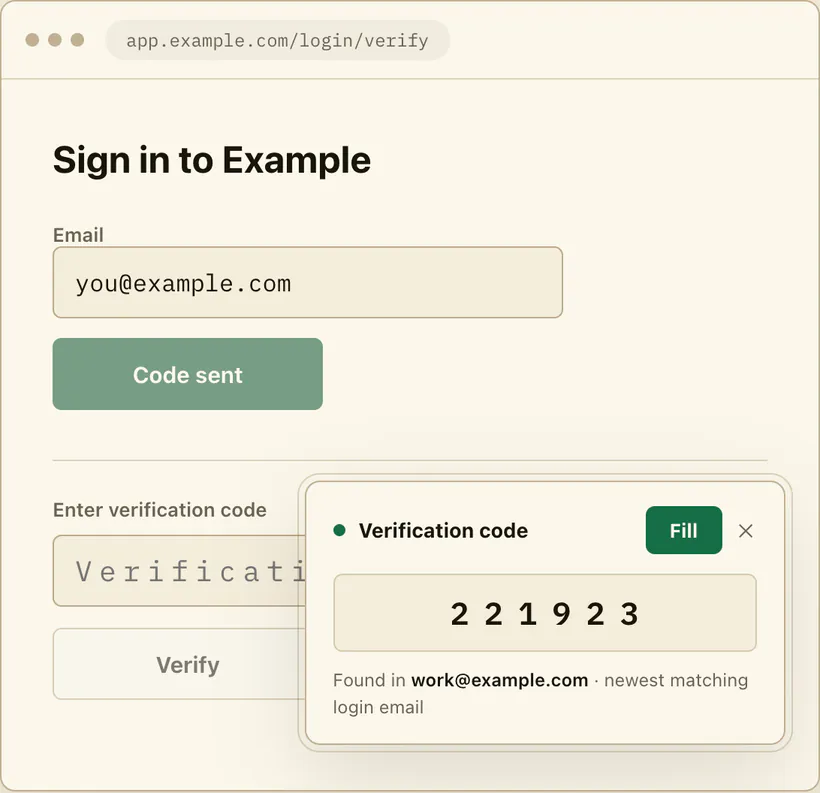
Honest boundaries: MagicLess cannot make the store's email arrive faster or stretch a cart hold, it never auto-submits the checkout form — the click stays yours — and it cannot vouch for a suspicious message; the FTC-grade judgment about mail you didn't trigger remains your job.
FAQ
How do I know which email address the store has on file?
Check the masked address hint on the verification prompt or the email field the checkout autofilled. Both identify the inbox without leaving the page, which is faster than searching two accounts.
The store says the code was sent but nothing is in my inbox — where is it?
Check Promotions and Updates if your Gmail shows category tabs, or search with in:anywhere to sweep Spam in the same pass. Merchant verification mail frequently inherits promotional filing.
Should I hit resend if the code doesn't arrive in 30 seconds?
No — give it 60 to 90 seconds and search first. A resend can invalidate the code already in flight, leaving you matching a dead code against a live attempt while the timer runs.
Will my cart really empty while I look for the code?
Hold behavior varies by store and isn't published reliably, so treat every countdown as real. The playbook above finishes in under a minute, which is inside almost any hold window.
A verification email arrived that I never requested during checkout — use it?
Don't. An unrequested verification message matching a moment of urgency is a known phishing pattern; use only the email your own click generated, and re-trigger if unsure.
Claim ledger
| Claim | Source | Last checked | Confidence |
|---|---|---|---|
| You can add and switch between multiple email accounts in Gmail on your computer. | Google Gmail account help | 2026-09-13 | High |
| Gmail can sort inbox mail into categories such as Promotions and Updates, moving some messages out of Primary. | Google Gmail categories help | 2026-09-13 | High |
Gmail search operators include from:, newer_than:, in:anywhere, and OR grouping. | Google Gmail search help | 2026-09-13 | High |
| Phishing emails imitate trusted companies and use urgency to push quick action, per FTC consumer guidance. | FTC phishing guidance | 2026-09-13 | High |
| Whether a resend invalidates the prior code is decided by each store's implementation; treating the newest code as the live one is the safe default. | Google Gmail search help | 2026-09-13 | Medium |
Sources
- Google Gmail Help - Add another email account on your computer: https://support.google.com/mail/answer/21289?hl=en
- Google Gmail Help - Organize your emails into categories: https://support.google.com/mail/answer/3094499?hl=en
- Google Gmail Help - Refine searches in Gmail: https://support.google.com/mail/answer/7190?hl=en
- FTC Consumer Advice - How to recognize and avoid phishing scams: https://consumer.ftc.gov/articles/how-recognize-and-avoid-phishing-scams