Yahoo Mail Put Your Code in Spam? What to Check First
Recover a verification code or sign-in link from Yahoo Mail's Spam folder, mark it Not spam so the next one reaches your inbox, and use the right resend timing for Yahoo codes and for other services.
When a verification code or sign-in link does not show up in Yahoo Mail, check Spam first. Open Spam, find the message, and click Not spam to move it to your inbox, which also sends future messages from that sender to the inbox. If the missing code is one Yahoo sends to sign in to your Yahoo account, Yahoo's help page says to click Resend within the first five minutes if the code does not arrive. For codes other services send to your Yahoo address, the resend timing is that service's rule; Yahoo does not publish one.
Yahoo's support article on verification code and link issues covers delivery causes in general, and folds a spam-folder check into the same troubleshooting flow as landline numbers, blocked devices, and outdated contact info. Treat Spam as step one, not a last resort.
What should you do in each case? (recovery table)
Check Spam first, click Not spam on the message, and resend only by the right rule: within the first five minutes for Yahoo's own sign-in codes, or by the sending service's rule for everything else.
| Situation | What Yahoo's help says | What to do |
|---|---|---|
| Code or link is missing entirely | Check the Spam folder before assuming it was never sent | Open Spam; if the "Spam" label is not visible, click More below Sent |
| You found it in Spam | Click Not spam on the message | This moves it to your inbox and Yahoo begins trusting the sender |
| A Yahoo account sign-in code has not arrived | Yahoo's help page: click Resend within the first five minutes | Check Spam, then click Resend; use the newest code that arrives |
| A code from another service has not arrived | Resend timing is Not published by Yahoo; it is the sending service's rule | Check Spam first, then follow the sending site's resend button or wait time |
| A mailing-list message from a trusted sender is marked spam | Yahoo may offer Unsubscribe instead of a hard spam mark | This is for mailing lists, not one-time codes; use Not spam for login mail |
- I opened Spam and looked for "More" below Sent if the folder was not visible.
- I clicked Not spam on the actual message, not just previewed it.
- I checked Spam before I clicked Resend.
- I am using the newest message that arrived after any resend, not an older Spam-filed copy.
- I did not paste the code into anywhere other than Yahoo's own sign-in page.
What does Not spam change for the next code?
Yahoo's own help documentation states that marking a message Not spam moves it into your inbox and that future messages from that sender will then be delivered to the inbox — so this single click is also the fix for the next code, not just the one blocking you right now. That is why the order matters: rescue the current message with Not spam before you consider resending, because a resend from a still-untrusted sender is just as likely to land in Spam again.
When should you click Resend?
After you check Spam. For Yahoo's own sign-in codes, Yahoo's help page says to click Resend within the first five minutes if the code or link does not work or does not arrive, and then to check your alternate email, spam folder and ISP blocking if it still does not come. Yahoo publishes no wait time for codes that other services send to a Yahoo inbox, so use that service's resend button and timing. Either way, rescue the Spam copy first: a resend from a sender Yahoo still treats as spam can land in Spam again.
Do mailing lists behave like login codes?
Yahoo's spam-management help distinguishes a mailing-list message, where marking it spam can trigger an unsubscribe offer if Yahoo already trusts the sender, from an ordinary spam mark. A one-time login code is not a mailing list, so that unsubscribe path is not relevant here — the action you want is always Not spam on the specific verification message, not an unsubscribe flow.
What if Spam is empty and Resend does not help?
At that point the problem has likely moved past Yahoo's spam filter. Confirm the login attempt is still active on the page that requested the code, and consider whether the address on file is actually the Yahoo address you are checking — see choosing the right code when several look-alike emails are involved if more than one account or alias might be in play, or how to tell a legitimate spam-filed code from a fake one if something about the message itself looks off before you trust it.
Where does MagicLess fit?
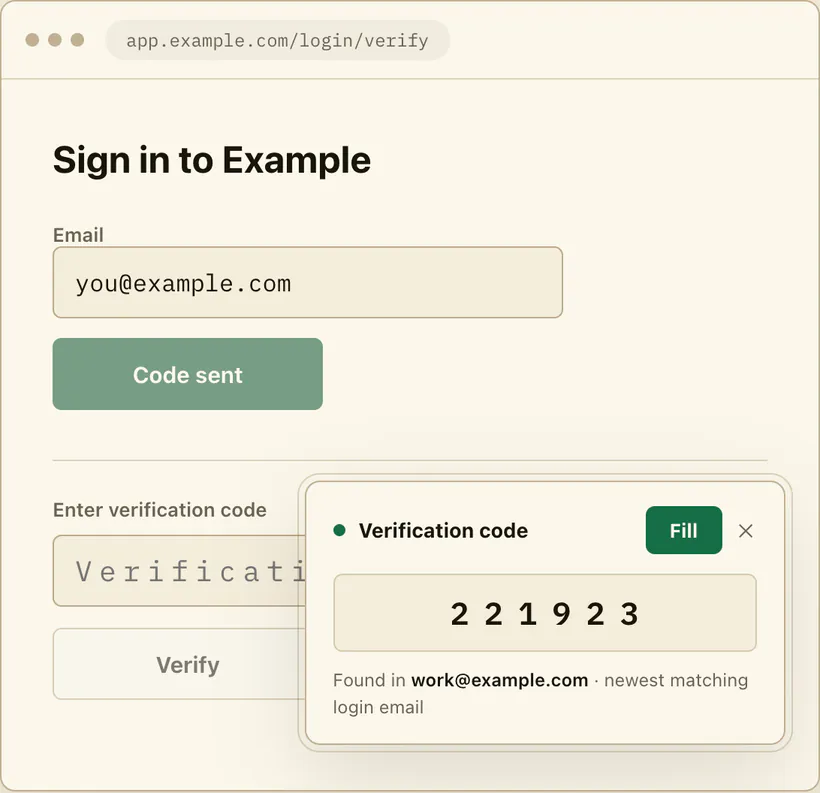
MagicLess connects to Gmail inboxes you choose to link, not Yahoo Mail, so it cannot open a Yahoo Spam folder for you. Where it does help is the adjacent, common case: people who keep a Yahoo address for some accounts and a connected Gmail inbox for others. MagicLess cannot reach a Yahoo inbox, but for the connected Gmail accounts people run alongside Yahoo, it shows the newest code on the login page itself, which is one less Spam folder to check mid-login. For anything landing in Yahoo Mail specifically, the table above is the direct path.
FAQ
Why does Yahoo Mail send a verification code straight to Spam?
Yahoo's spam filter evaluates new or unfamiliar senders the same way it evaluates any other mail, and a one-time-code sender frequently looks unfamiliar on an early message.
How do I get a Yahoo verification code out of Spam?
Open the Spam folder (click More below Sent if it is hidden), select the message, and click Not spam to move it to your inbox.
How long should I wait before clicking Resend in Yahoo Mail?
For Yahoo's own sign-in codes, Yahoo's help page says to click Resend within the first five minutes if the code has not arrived. For codes from other services, Yahoo publishes no wait time; follow the sending site's resend option after you check Spam.
Does clicking Not spam once fix future codes from the same sender?
Yes. Yahoo's help page states future messages from that sender are then delivered to the inbox rather than Spam.
Is it safe to trust a verification email I find in Spam?
Check the sender address and that you actually requested it before entering anything from it; NIST's digital identity guidance treats one-time authentication secrets as sensitive, so a code you did not request should not be used even if it looks real.
Claim ledger
| Claim | Source | Last checked | Confidence |
|---|---|---|---|
| Yahoo's help page instructs checking the Spam folder as part of troubleshooting missing verification codes and links. | Yahoo Help: Fix issues with Yahoo verification codes and links | 2026-09-16 | High |
| Yahoo's help page instructs clicking Resend within the first five minutes if a code or link fails or does not arrive. | Yahoo Help: Fix issues with Yahoo verification codes and links | 2026-09-16 | High |
| Marking a Yahoo Mail message Not spam moves it to the inbox and future messages from that sender are delivered to the inbox. | Yahoo Help: Manage spam and mailing lists in Yahoo Mail | 2026-09-16 | High |
| One-time authentication secrets should not be trusted or used if you did not initiate the request. | NIST SP 800-63B | 2026-09-16 | Medium |
Sources
- Yahoo Help: Fix issues with Yahoo verification codes and links
- Yahoo Help: Manage spam and mailing lists in Yahoo Mail
- NIST: Special Publication 800-63B