Does Chrome Autofill Codes? Android SMS Yes, Email No
Chrome autofills SMS verification codes on Android and, through an Android phone, on desktop. Google documents no feature that fills emailed codes. Full platform-by-platform breakdown.
On Android, yes, for SMS codes, because Chrome requests explicit permission to read one-time codes from text messages and documents that behavior on its own help pages. For email codes, Chrome itself has no such feature: we found nothing in Google's Chrome Help, Chrome for Developers, or Google Password Manager documentation that reads a code out of Gmail, Outlook, or any other inbox and fills it into a form. The one exception comes from Apple, not Google: on macOS 26 and later, the Mac can offer codes from its own Mail and Messages apps in other apps. Those sentences cover most of what people actually mean when they ask this, but the desktop story has more nuance than a flat yes or no, so this page goes platform by platform.
What does Chrome actually autofill on Android?
Chrome's own Android help page describes a specific, permission-gated feature: "When Chrome identifies a website form with a one-time SMS verification code field for the first time, it requests permission to autofill SMS codes." After that, Chrome shows a prompt, and when you tap it, the SMS code field is filled. You manage the permission in the Android Settings app under your Google Account > All services > Verification codes by SMS, with separate switches for "Autofill codes in apps and sites" and "Autofill codes in your default browser." The page is scoped to SMS. It does not mention email at all, in either direction — not to confirm support, not to rule it out; the absence itself is the closest thing to Google's position on email codes in this exact document.
Does Chrome autofill codes on a desktop computer?
Chrome's desktop code autofill is real, but it is narrower than the Android version and depends on a second device. Chrome for Developers documents a cross-device mode of the WebOTP API: starting from Chrome 93, websites can verify phone numbers from desktop Chrome, using an SMS that arrives on an Android phone. The user must sign in to the same Google account on desktop Chrome and on Chrome for Android (sync does not need to be on), and Google says receiving and transmitting SMS in Chrome on iOS or iPadOS is not supported. There is no telephony radio in a laptop, so desktop Chrome cannot read a text message on its own; this feature exists specifically to bridge a code that landed on your phone into a page open on your computer. It is still SMS-only. MDN's WebOTP API reference confirms the same scope from the web-standards side and lists the feature as having limited availability across browsers, meaning it is not something every browser supports the same way.
What is the WebOTP API, exactly, and does it cover email?
The WebOTP API, which Chrome implements, is a browser API that lets a website request an SMS one-time code the user's device already received, formatted with the site's domain in the message so the browser knows which page to hand the code to. MDN's description is specific: the API "eliminates manual copy-paste" for SMS codes used in sign-in or payment confirmation, and its documented flow starts with an SMS arriving in a specially formatted way. Neither MDN nor Chrome for Developers describes any email equivalent. There is no WebOTP-style API for reading a code out of an inbox; the mechanism was built around SMS's system-level delivery, which email doesn't have on a website's terms. If you build a login page, the one-time code field checker tests your code field and your text-message format against these rules.
Does Google Password Manager fill verification codes of any kind?
We found no documented support. Google's "Get started with Google Password Manager" help page describes saving and filling passwords and passkeys, and on September 16, 2026 it did not mention authenticator (TOTP) codes or email codes. Some other password managers, such as 1Password and Bitwarden, do fill TOTP codes that you store in them. Until Google documents otherwise, do not expect Google Password Manager to fill either kind of verification code.
What does Chrome autofill, platform by platform?
The table below breaks this down by platform and code type, marking a cell "not documented" wherever no Google or Apple page reviewed for this guide states the behavior one way or the other:
| Platform | SMS codes | Email codes | Authenticator (TOTP) codes | Passkeys |
|---|---|---|---|---|
| Android | Yes, with permission; Chrome Help documents the prompt and settings path | Not documented | Not documented for Google Password Manager | Yes; stored in Google Password Manager |
| Windows | Only cross-device, from an Android phone signed in to the same Google account | Not documented | Not documented | Yes; stored in Google Password Manager |
| macOS before macOS 26 | Only cross-device, same as Windows | Not documented | Not documented | Yes; stored in Google Password Manager or iCloud Keychain |
| macOS 26 "Tahoe" and later | Cross-device, plus Apple's macOS AutoFill for codes received in Messages, which Apple enables in apps that support typing text; Chrome users report it as inconsistent | Apple's same AutoFill for codes received in the Mail app; not a Google feature | Not documented | Yes, same as above |
| ChromeOS | Only cross-device, same mechanism as Windows | Not documented | Not documented | Yes; stored in Google Password Manager |
| iOS / iPadOS (Chrome app) | WebOTP SMS in Chrome is not supported, per Chrome for Developers | Not documented | Not documented | Yes; stored in iCloud Keychain by default, Google Password Manager selectable on iOS/iPadOS 17+ |
The macOS 26 row is Apple's mechanism, not a Chrome feature Google documents; the companion guide Safari autofills Mail codes; Chrome depends on your Mac covers that specific change and its Apple sources in full, since it is really a macOS story that happens to touch Chrome, not the other way around.
Does Microsoft Edge do any better?
We found no documented Edge feature for email codes either. On Microsoft's own Q&A site, a Mac user asked whether Edge could pull security codes from iMessage or Mac Mail the way Safari does, "even if its an extension." The answer marked helpful, from an independent advisor, points to two third-party Mac tools, 2FHey and Raycast's 2FA Code Finder, not to a built-in Edge setting. That is one thread, not a Microsoft statement, but it matches what we found in the Chrome documentation: in both browsers, email codes need a tool outside the browser's own autofill.
What should you use instead for email codes in Chrome?
- Search your inbox directly. It works on every platform in this table with zero setup: open Gmail (or whichever provider), search for the newest matching message, copy the code, and paste it into the Chrome tab.
- Move the site to an authenticator app where it's offered. A TOTP code is something Chrome's own Google Password Manager still won't generate, but a dedicated authenticator app or a password manager that does support TOTP will, and that code never depends on email delivery again.
- Use a Chrome extension that reads the inbox for you. This is a different layer entirely from anything in the table above — it doesn't extend Chrome's built-in autofill, it connects to your email account directly. Gmail OTP autofill extensions compared: what each one actually reads lines up several options side by side, including what each one claims to read and where.
Where does MagicLess fit?
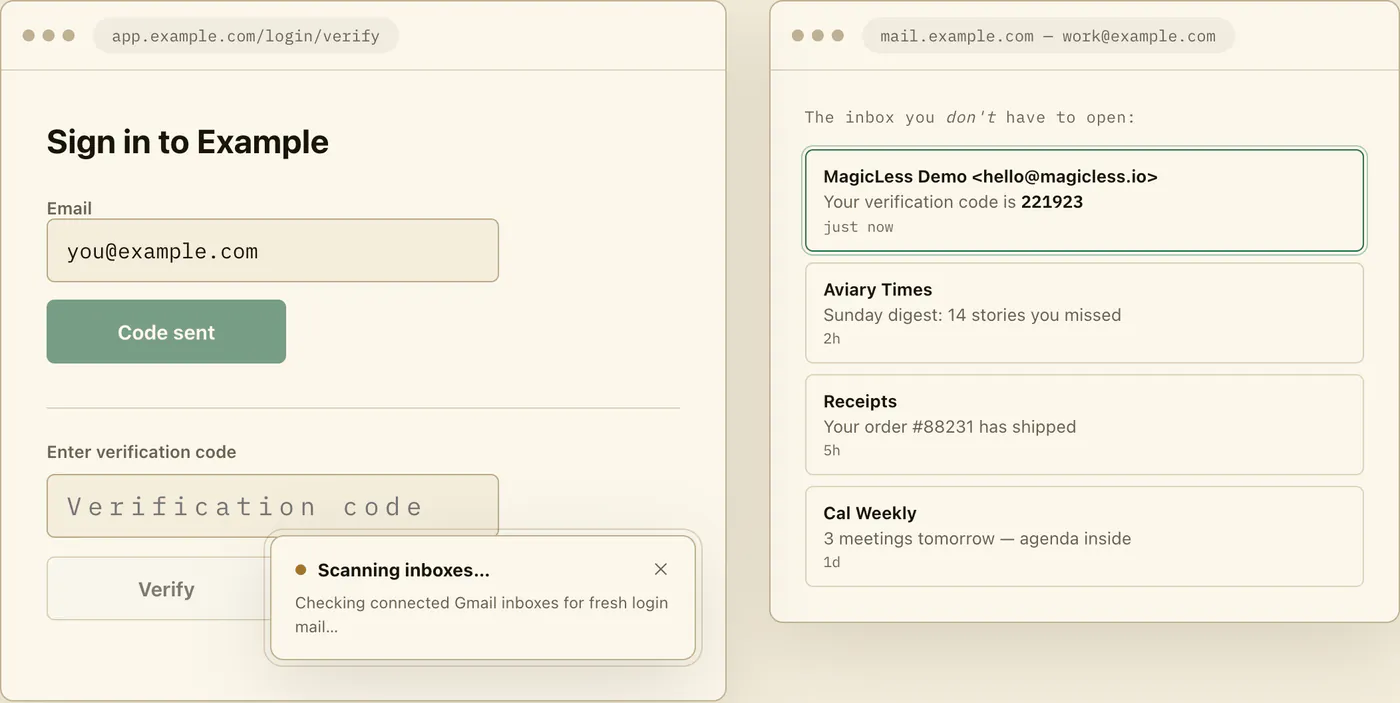
MagicLess does not extend Chrome's own autofill at all; it is a separate extension that reads a Gmail inbox you connect and offers the code on the page, which is the option that actually gets an email code into Chrome, on any desktop OS, since Chrome itself does not do it. It only reads Gmail, not Outlook, Yahoo, or IMAP inboxes; it never handles SMS or TOTP, both of which stay squarely inside the gaps this table already documents; it processes the connected inbox server-side through Composio rather than fully on-device; it only runs in Chrome; and it is not open source. If you want a local-only tool, or your codes arrive somewhere other than Gmail, it's the wrong fit. If your password manager is part of the same login and you want to know exactly why it stops at the password step, why your password manager fills everything except the email code covers that structural gap on its own terms. Before installing MagicLess or any comparable extension, it's worth running through what to check before you install an OTP autofill Chrome extension.
FAQ
Does Chrome autofill OTP codes on desktop?
Only SMS codes, and only in a cross-device mode where a phone signed into the same Google account as desktop Chrome receives the text; Chrome for Developers documents this as the WebOTP API's cross-device capability. We found no Google-documented desktop feature for email codes.
Is there a Chrome setting to enable email code autofill?
Not one found on Chrome's own help pages, Chrome for Developers documentation, or Google Password Manager's help pages, as of the sources checked for this guide on September 16, 2026. If such a setting exists, it isn't documented on the pages Google publishes about autofill and verification codes.
Does Google Password Manager store authenticator (TOTP) codes like 1Password or Bitwarden do?
The Google Password Manager help page reviewed for this guide describes storing passwords and passkeys, with no mention of TOTP generation. Based on that absence, treat TOTP as unsupported by Google Password Manager, unlike password managers that document it explicitly.
Why does SMS autofill work on Android but not email?
SMS arrives through a system-level channel (the phone's messaging stack) that Chrome on Android has permission hooks into, per Chrome's own Android help page. Email arrives inside a mail app or webmail tab with no equivalent OS-level hook, so autofilling it requires a tool that connects to the inbox directly rather than one that taps into a system message channel.
Does the macOS 26 AutoFill change mean Chrome now supports email codes on Mac?
Not as a Chrome feature. Apple's developer documentation says that in macOS 26 and later, all Mac apps that support typing text get AutoFill for codes received by Messages or Mail, so Chrome can show that offer, but it only covers mail in Apple's Mail app, and Chrome users report that it works inconsistently. See Safari autofills Mail codes; Chrome depends on your Mac for the full breakdown.
Claim ledger
| Claim | Source | Last checked | Confidence |
|---|---|---|---|
| Chrome on Android requests permission to autofill one-time SMS verification codes; the setting is under Google Account > All services > Verification codes by SMS. | Google Chrome Help: Fill out forms automatically (Android) | 2026-09-16 | High |
| WebOTP is SMS-specific; from Chrome 93, desktop Chrome can use an SMS received on an Android phone when both run Chrome signed in to the same Google account, and Chrome on iOS/iPadOS is not supported. | Chrome for Developers: WebOTP API, Cross-device WebOTP | 2026-09-16 | High |
| MDN documents the WebOTP API as SMS-only, with limited availability across browsers. | MDN: WebOTP API | 2026-09-16 | High |
| Google Password Manager's own help documentation covers passwords and passkeys, with no mention of TOTP or email-code autofill. | Google Account Help: Get started with Google Password Manager | 2026-09-16 | Medium |
| Chrome supports passkey creation and use on Android, Windows, macOS, ChromeOS, and iOS/iPadOS; storage is Google Password Manager, with iCloud Keychain as an option on macOS and the default on iOS/iPadOS. | Google for Developers: Passkey support on Android and Chrome | 2026-09-16 | High |
| On Microsoft Q&A, a Mac user asked whether Edge can fill security codes from iMessage or Mac Mail; the answer marked helpful recommends 2FHey and Raycast's 2FA Code Finder. | Microsoft Q&A: Auto-fill security codes from SMS/email | 2026-09-16 | Medium |
Sources
- Google Chrome Help: Fill out forms automatically in Chrome (Android)
- Chrome for Developers: Verify phone numbers on the web with the WebOTP API
- Chrome for Developers: Verify a phone number on desktop using WebOTP API
- MDN Web Docs: WebOTP API
- Google Account Help: Get started with Google Password Manager
- Google for Developers: Passkey support on Android and Chrome
- Microsoft Q&A: Auto-fill security codes from SMS/email