Gmail OTP Extensions Compared: 19 Listings Checked
A dated, verified roundup of every live Chrome extension that reads OTP codes or magic links from your own Gmail inbox, including MagicLess, checked against each Chrome Web Store listing on September 16, 2026.
If you want a Chrome extension that fills codes from Gmail, you are choosing among roughly two dozen small Chrome extensions that all do the same basic thing: watch a login page, check a connected Gmail inbox, and put the code or link in front of you. They differ in whether they read only your own inbox or several, whether the email is processed on your device or somewhere else, and whether they fill the field automatically or wait for a click. This page checked 19 live listings, including MagicLess, against their own Chrome Web Store pages on September 16, 2026, and lists what each one actually states about itself, not what a marketing page implies.
None of these tools are interchangeable. Some read Gmail only; a couple also cover Outlook or an IMAP mailbox. Some run entirely inside your browser; a few route through a developer's server or an AI model. This is a roundup, not a checklist — if you want the general questions to ask before installing any of them (permissions, wake conditions, fill-versus-submit behavior), the pre-install checklist covers that ground and this page does not repeat it. And if you'd rather skip installing anything at all, Gmail search operators that actually help find new codes is the manual version of what most of these extensions automate.
What counts as a Gmail OTP extension for this list?
This list includes Chrome extensions that connect to a Gmail account you authorize and read an actual message (a code or a magic link) out of it, on a page where you are logging in. It excludes password managers, which fill saved secrets rather than reading email — see why your password manager fills everything except the email code for that structural gap — and dev/QA inbox-testing tools like Mailosaur or Mailinator, which are built for automated test suites rather than a person's own inbox. One extension turned up in search but its Chrome Web Store page returned empty content when checked, so it looks removed and is left off the table below rather than listed on stale information.
Which Gmail extensions actually read codes from your own inbox?
This Gmail code extension comparison table is the useful artifact for this page: every row was checked against its own Chrome Web Store listing (or, for InboxKey, its linked GitHub project) on September 16, 2026.
| Extension | Codes / links | Inboxes | Where mail is processed | Fills or copies | Users (Sep 16, 2026) | Last updated |
|---|---|---|---|---|---|---|
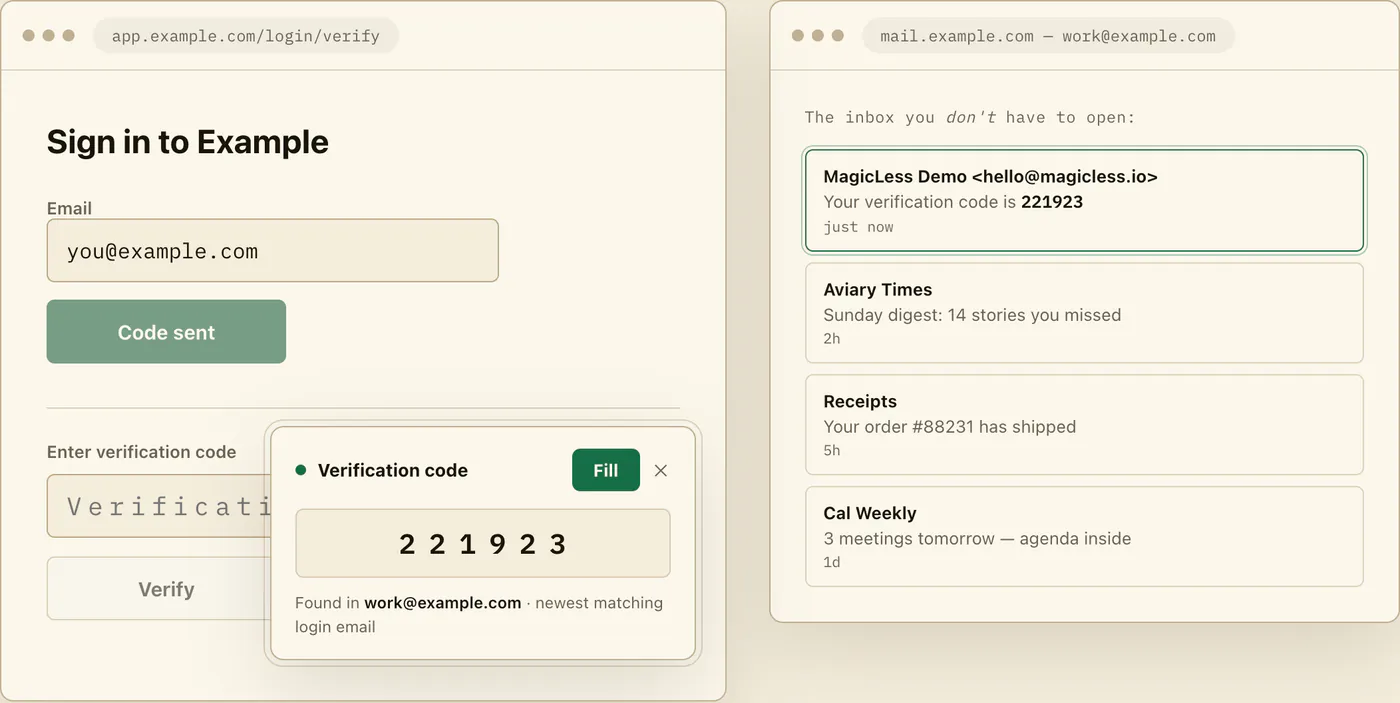
| MagicLess | Codes + magic links | Up to 5 Gmail inboxes | Server-side, via Composio (Vercel-hosted backend) | Fill code / Open link, on click; never auto-submits | No count shown on the listing | Sep 7, 2026 (v0.1.4) |
| InboxKey – Autofill Verification Codes | Codes + magic links (opens only after you confirm) + SMS via Google Messages pairing | Gmail + most IMAP mailboxes (Outlook, Yahoo, Fastmail, iCloud, Proton via Bridge) | Local, via the InboxBridge desktop helper; credentials in the OS keychain | Configurable: fill and submit, fill only, copy, or notify | 125 | May 9, 2026 (v1.1.0) |
| Houdini – Get OTPs | Codes + login links | Gmail, multiple accounts | Not stated precisely; OAuth 2.0, developer says no sensitive data is stored in the browser | Fills automatically | 20 | May 2, 2025 |
| 2FacTrac | Codes + links matched to the current site | Gmail, last 5 minutes of mail | Not stated; listing says it does not store codes, links, or email content | Copy with one click, or open the matched link | 30 | Apr 26, 2025 |
| Auto Email Code Filler – 2FA & Login Link Helper | Codes + login links, AI-assisted extraction | Gmail | AI model; developer says processing runs "locally or with secure communication to AI models" | Fills the field, or copies for manual paste | 55 | Apr 19, 2025 (v0.1) |
| Quickfill – Gmail OTP & 2FA Code Autofill | Codes, 4–8 digit or alphanumeric | Gmail, multiple accounts | Local; developer states mail is "read inside your browser and never sent anywhere" | Fill by click or right-click menu, or copy | 111 | Sep 15, 2026 (v0.3.2) |
| OTP Smart Fill | Codes | Gmail only | Local; read-only Gmail access, recent codes stored on-device | Fills on click | 223 | Jun 26, 2026 |
| OttoKey – 2FA code fetcher | Codes | Gmail + Outlook, up to 5 inboxes | Local; no OttoKey server, MIT-licensed open source | Fills automatically, plus one-tap copy | 12 | Aug 4, 2026 (v2.0) |
| AutoFill Code | Codes | Gmail, read-only | Local, with one stated exception: on Opera, an encrypted renewal credential passes through a stateless authentication service that the developer says cannot access mail | Detects the field and helps you fill the code | 36 | Sep 13, 2026 |
| MailKey | Codes, with a sender-match badge | Gmail | Local; developer states there is no backend and requests go straight from the browser to Google | Fills only after you click, once you've checked the sender; never auto-submits | 2 | Jul 23, 2026 |
| MailCodeReader | Codes | Gmail, multiple accounts | Not stated on the listing | Fills automatically | 35 | Dec 3, 2025 |
| OTPal | Codes, shown for you to copy | Gmail | Local, per the listing | Copy only; does not autofill | 53 | Jun 29, 2026 |
| Flash OTP | Codes | Gmail | Local; read-only Gmail OAuth, listing says it does not store mail | Fills after you click Get OTP | 33 | Jun 18, 2025 |
| BlinkOTP | Codes | Gmail, multiple accounts | Local; read-only Gmail access, listing states no email storage | Fills automatically | 6 | Jul 15, 2026 |
| QuickAuth | Codes, via a right-click menu | Gmail, multiple accounts | Local extraction logic with no AI, per the listing; no backend data storage | Shows likely codes in-page; one-click copy | 14 | Mar 27, 2026 |
| Gmail OTP Fetcher | Codes | Gmail | Not stated on the listing | Displays the code; autofill is not stated | 18 | Jun 6, 2026 |
| Auto Verification Code Filler | Codes | Gmail | Not stated on the listing | Fill via a right-click paste action, plus a notification when a code arrives | 27 | Jul 30, 2025 |
| Email Code Extractor | Codes, inside Gmail's own inbox list | Gmail | Local; listing states processing is "100% locally on your device" | Copy button next to the sender, inside Gmail itself, not a fill on third-party login pages | Not stated on the listing | Dec 10, 2025 |
| Email OTP Autofill | Codes | Gmail, Outlook, QQ Mail, via a local agent | Fetches codes from a separate agent program, per the listing | Fills the current page | 18 | Sep 1, 2026 |
A couple of these deserve a note beyond the table. MailCodeReader is the only listing here that says it offers in-app purchases. Email Code Extractor is not a login-page autofill tool at all in the usual sense — its copy button sits inside Gmail's own message list, for grabbing a code before you switch tabs, which is a different job than filling a code into a bank or SaaS login form.
How should you choose between them?
Codes and links, or codes only?
If a service you use relies on magic sign-in links as often as codes, narrow the list first: MagicLess, InboxKey, Houdini, 2FacTrac, and Auto Email Code Filler all state link support; most of the others handle codes only. If your logins are code-only, that distinction does not matter.
Local processing, or a server in between?
InboxKey, OttoKey, MailKey, Quickfill, OTP Smart Fill, OTPal, AutoFill Code (outside Opera), Flash OTP, BlinkOTP, QuickAuth, and Email Code Extractor all describe local processing on their own listings. MagicLess and Auto Email Code Filler are the two that name a server or AI model in the path: MagicLess routes Gmail access through a Composio-backed API on Vercel, and Auto Email Code Filler says everything runs "locally or with secure communication to AI models." Several listings (Houdini, 2FacTrac, MailCodeReader, Gmail OTP Fetcher, Auto Verification Code Filler, Email OTP Autofill) do not say where mail is processed, which is worth asking the developer before you grant Gmail access.
One inbox, or several?
If you juggle a personal and a work Gmail account, or non-Gmail mail too, that narrows the field fast. Three entries reach outside Gmail: InboxKey (most IMAP mailboxes, including Outlook, Yahoo, Fastmail, iCloud, and Proton via Bridge), OttoKey (Gmail and Outlook), and Email OTP Autofill (QQ Mail, Outlook, and Gmail through its agent). MagicLess, OttoKey, Houdini, Quickfill, MailCodeReader, BlinkOTP, and QuickAuth all state support for more than one account; the other listings do not say. None of the 19 handle authenticator-app (TOTP) codes; if a site offers TOTP as an alternative to emailed codes, switching to an authenticator app covers what to set up first, since that path removes the email step entirely rather than automating it.
How recently was it actually updated?
Seven of the 19 have not shipped an update since 2025. That is not automatically disqualifying for a small, single-purpose tool, but check the version history yourself before you trust one with a new Gmail grant, because the listing cannot tell you whether "no updates" means "stable" or "abandoned." Quickfill and AutoFill Code were updated in the week before this check, and MagicLess, Email OTP Autofill, and OttoKey since the start of August 2026.
What about temp-mail and Firefox options?
Two Chrome extensions in this space are a different category entirely: 1Click Temp Mail with Autofill (284 users as of this check) and FlashFill (10 users) both generate a disposable throwaway address and OTP-fill from that burner inbox, not from your own Gmail. They solve a different problem — hiding your real address from a signup form — and neither reads your existing mailbox. On Firefox, OTP Assist reads codes from webmail tabs you already have open (Gmail and Outlook Web are the stated examples) rather than connecting to an account by OAuth; it had 1 user as of this check and is worth knowing about only if Chrome is not your browser.
Where does MagicLess fit in this comparison?
MagicLess is honestly one of the narrower entries here, not the most capable one. It is Gmail-only, with no Outlook or IMAP support; it is Chrome-only; it does not handle SMS codes or authenticator-app (TOTP) codes at all, and it suppresses itself on those pages rather than guessing; its Gmail access runs through a server-side Composio integration rather than staying entirely on your device; and it is not open source. MagicLess is one row in the table above, not the whole story: it is the Gmail-only, server-side entry that never submits a form, sitting next to several local-only alternatives that cover more inboxes. If local-only processing or non-Gmail mailboxes matter more to you than setup speed, the table above points to better fits, particularly InboxKey. A closer, dedicated head-to-head between those two is in MagicLess vs. InboxKey: server Gmail, or local IMAP bridge?.
For codes and links that arrive by SMS instead of email, see does Chrome autofill verification codes? Android SMS: yes. Email: no. For Mac-native alternatives that live in the menu bar instead of the browser toolbar, see Mac apps that read verification codes: Raycast, 2FHey, and email.
FAQ
Which of these extensions has the most users as of September 16, 2026?
Among the ones with a visible count on their Chrome Web Store listing, OTP Smart Fill leads at 223 users, followed by InboxKey at 125 and Quickfill at 111. MagicLess and Email Code Extractor show no count at all. Every count on this list is small, so none of these tools is widely adopted yet.
Which one processes mail without a server in the loop?
InboxKey, OttoKey, MailKey, Quickfill, OTP Smart Fill, OTPal, Flash OTP, BlinkOTP, QuickAuth, Email Code Extractor, and AutoFill Code (except its Opera sign-in renewal) each describe local processing on their own listing. MagicLess and Auto Email Code Filler are the two that name a server or AI model in the data path.
Does any of these read Outlook or another non-Gmail inbox?
Three do. InboxKey reads most IMAP mailboxes through its local InboxBridge helper, OttoKey reads Gmail and Outlook, and Email OTP Autofill fetches codes from QQ Mail, Outlook, or Gmail through a separate agent. MagicLess reads Gmail only.
Is a higher user count a sign of a safer extension?
Not by itself. A larger count means more people have installed it, not that its privacy claims have been independently audited. Read the specific claim on the listing (local processing, no backend, OAuth scope) rather than treating adoption as a stand-in for a security review.
Why isn't every Gmail code extension on this table?
One additional result found in search had an empty Chrome Web Store listing page at the time of this check, meaning it looks removed; it is not included so this table doesn't repeat a fact that could no longer be verified. Dev/QA inbox tools and password managers, which serve different jobs, are also excluded by design.
Claim ledger
| Claim | Source | Last checked | Confidence |
|---|---|---|---|
| MagicLess is at version 0.1.4, updated September 7, 2026, and its Chrome Web Store listing shows no user count. | MagicLess — Chrome Web Store | 2026-09-16 | High |
| InboxKey processes mail locally via its InboxBridge desktop app, supports Gmail plus several IMAP providers, and is source-available under PolyForm Noncommercial. | InboxKey — GitHub | 2026-09-16 | High |
| Quickfill states mail is read inside the browser and never sent anywhere, has 111 users, and was last updated September 15, 2026. | Quickfill — Chrome Web Store | 2026-09-16 | High |
| OttoKey states there is no OttoKey server and that its code is MIT-licensed and open source. | OttoKey — Chrome Web Store | 2026-09-16 | High |
| Auto Email Code Filler describes using AI to extract the code or link, and states processing runs locally or with secure communication to AI models. | Auto Email Code Filler — Chrome Web Store | 2026-09-16 | High |
Sources
- MagicLess — Chrome Web Store
- InboxKey — Chrome Web Store
- InboxKey — GitHub
- Houdini – Get OTPs — Chrome Web Store
- 2FacTrac — Chrome Web Store
- Auto Email Code Filler – 2FA & Login Link Helper — Chrome Web Store
- Quickfill – Gmail OTP & 2FA Code Autofill — Chrome Web Store
- OTP Smart Fill — Chrome Web Store
- OttoKey – 2FA code fetcher — Chrome Web Store
- AutoFill Code — Chrome Web Store
- MailKey — Chrome Web Store
- MailCodeReader — Chrome Web Store
- OTPal — Chrome Web Store
- Flash OTP — Chrome Web Store
- BlinkOTP — Chrome Web Store
- QuickAuth — Chrome Web Store
- Gmail OTP Fetcher — Chrome Web Store
- Auto Verification Code Filler — Chrome Web Store
- Email Code Extractor — Chrome Web Store
- Email OTP Autofill — Chrome Web Store
- OTP Assist — Firefox Add-ons
- 1Click: Temp Mail with Autofill — Chrome Web Store
- FlashFill — Chrome Web Store