Safari Autofills Mail Codes; Chrome Depends on Your Mac
Safari has filled verification codes from Mail since 2023. Chrome gets the same system offer only on macOS 26 and later, and users report it is inconsistent. Here is the breakdown and what to use instead.
Safari has read a verification code out of the Mail app and offered to fill it since iOS 17 and macOS Sonoma in 2023, and Chrome does not get that same offer on Windows, ChromeOS, or older Macs. The wrinkle many comparisons miss: Apple's developer documentation says that in macOS 26 ("Tahoe") and later, all Mac apps that support typing text also get AutoFill for codes delivered to Messages or Mail. That puts Chrome on newer Macs in scope, but Chrome users on Google's own help forum report that it works inconsistently.
That single wrinkle is the difference between a clean "no" and the more honest "it depends on your Mac's OS version and some luck." Below is the breakdown by platform, what Apple's pages actually say, and what to do if you use Chrome and can't wait on Apple's rollout to settle down.
What does Safari's Mail code autofill actually do?
Apple's 2023 announcement is the origin of this feature: "one-time verification codes received in Mail will now automatically autofill in Safari." When a site sends you a numeric code by email and you land on a form asking for it, Safari shows a suggestion above the keyboard (iPhone/iPad) or near the field (Mac), and one tap or click drops the code in. Apple's iPhone user guide adds a related setting: in Settings > General > Autofill & Passwords, under Verification Codes, you can turn Delete After Use on or off, which deletes the one-time codes after AutoFill enters them. (Most of that same Apple page is about a different feature: codes the Passwords app generates from a setup key.) If the suggestion does not appear on an iPhone, work through the iPhone checks in order.
Two things Apple's pages do not say, so this guide won't either: they don't specify whether the feature behaves differently for a Gmail account added inside the Apple Mail app versus an iCloud address, and they don't claim any accuracy or speed figure. Treat "works with Mail" as working with whatever accounts you've added to Mail, without assuming Gmail-in-Mail is called out specially, because it isn't, on the pages checked for this guide.
Where do Safari and Chrome differ, platform by platform?
The real split is less "Safari yes, Chrome no" and more "it depends on the operating system and, on the newest Mac software, the browser's own behavior that day."
| Browser & platform | Code type | Reads from | Autofills today? | Source |
|---|---|---|---|---|
| Safari, iOS/iPadOS 17 or later | Email codes | Mail app | Yes, since 2023 | Apple Newsroom |
| Safari, macOS Sonoma or later | Email codes | Mail app | Yes | Apple Newsroom |
| Safari, iPhone and Mac | SMS/iMessage codes | Messages app | Yes | Apple support guides |
| Chrome or Brave, Windows / ChromeOS / Linux | Email codes | — | No; there is no Mail app on that OS for it to read | Not documented by Apple; not applicable |
| Chrome or Brave, macOS Sonoma or Sequoia (before macOS 26) | Email codes from Mail | Mail app | No; before macOS 26 this was a Safari feature on the Mac | Apple Developer documentation (all-apps behavior starts in macOS 26); MacRumors, June 2025 |
| Chrome or Brave, macOS 26 "Tahoe" or later | Email or Messages codes | Mail or Messages app | Offered by macOS in apps that support typing text; Chrome users report it as inconsistent | Apple Developer documentation; Google Chrome Community thread |
| Chrome, Android | SMS codes only | Device SMS | Yes | Google Chrome Help |
| MagicLess extension, desktop Chrome (any OS) | Email codes + magic links, Gmail only | Connected Gmail account, read server-side | Fills on your click | MagicLess privacy policy |
Did macOS 26 actually change this for Chrome?
Yes, at the operating-system level. Apple's developer documentation for the property list key NSAutoFillRequiresTextContentTypeForOneTimeCodeOnMac says that in macOS 26 and later, all macOS apps that support typing text also enable Security Code AutoFill of codes received by Messages or Mail. The AutoFill menu can appear when Messages or Mail detects a one-time code, a text field has focus, and fewer than three minutes have passed since the code was detected. Apps that rarely use codes can set the key to limit the menu, and Apple notes that macOS skips this AutoFill for a small number of apps for compatibility. Apple's page does not name browsers; MacRumors reported in June 2025 that the macOS Tahoe betas filled codes from Messages in Google Chrome and other third-party browsers.
That is a genuine, documented change from the years when this was Safari's alone. But two caveats keep it from being a clean "Chrome now does this": first, it only applies on macOS 26 and later, so Chrome on an older Mac, or on Windows or ChromeOS, is unaffected. Second, whether Chrome's web-page fields reliably trigger the macOS suggestion is not settled for real users: Google's Chrome Community forum has a thread titled "SMS Autofill on Mac briefly worked in Chrome after macOS Tahoe update — now stopped working." Test it on your own Mac before you depend on it.
Is there a separate Mac support page for this, the way there is for iPhone?
Not one that matches the iPhone guide exactly, and that gap is worth flagging rather than papering over. Two adjacent Apple Mac support pages exist and are easy to confuse with the Mail-code feature: "Automatically fill verification codes on Mac" describes the Passwords app generating an authenticator-style (TOTP) code from a setup key you saved yourself, which is a different feature with a different code source than an emailed one-time code. "Autofill security codes from your iPhone in Safari on Mac" describes forwarding SMS codes from a nearby iPhone into Safari on Mac via Text Message Forwarding, which is about SMS, not Mail. On September 16, 2026, the macOS 26 change was documented on Apple's developer page, and we did not find an equivalent end-user Mac guide page for it.
What should Chrome users do if they read codes from Mail today?
- Switch browsers for the login itself. If you're on a Mac and just need one code, opening the same page in Safari for that single sign-in gets you the confirmed, longest-standing version of this feature with no OS-version caveat.
- Copy the code from Mail directly. It's the fallback that works regardless of browser, OS, or version: open Mail, find the newest matching message, copy the code, paste it into Chrome.
- Use a Mac menu-bar tool that watches Mail for you. Several small utilities exist specifically to surface a code from Mail or Messages without switching apps; see Mac apps that read verification codes: Raycast, 2FHey, and email for what each one actually reads and how it differs from Apple's own AutoFill.
- Install a Chrome extension that reads a specific inbox. This is a different mechanism entirely — the extension connects to your Gmail account rather than depending on Apple's Mail app or macOS version — and MagicLess is one example, covered next.
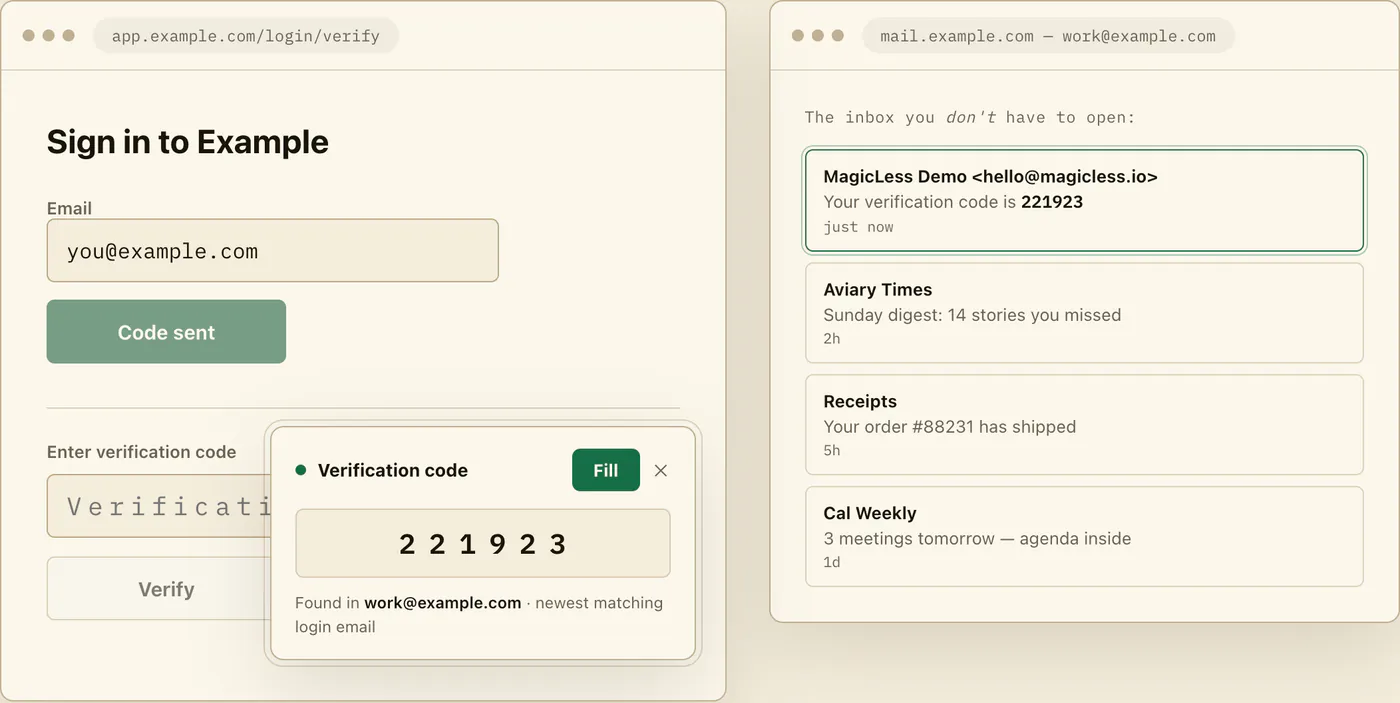
Where does MagicLess fit?
MagicLess does not touch Safari, Mail, or macOS's system AutoFill at all: it is a Chrome extension that reads a connected Gmail inbox directly, so the code shows up on the page whether or not your Mac has caught up to Apple's latest AutoFill behavior. That also means its limits are different from Apple's feature, not smaller or larger across the board: MagicLess only reads Gmail (no Outlook, Yahoo, or iCloud Mail), it only fills codes and magic links (no SMS, no authenticator-app codes), it only works in Chrome, it processes the connected inbox server-side through Composio rather than fully locally, and it is not open source. If your codes arrive somewhere other than Gmail, or you want a local-only tool, it is the wrong fit; if Gmail is where your codes land and you're on Chrome regardless of OS version, it removes the same tab-switch that Apple's feature removes for Safari users. For a broader look at what to check before installing anything in this category, including MagicLess, see what to check before you install an OTP autofill Chrome extension.
How does this relate to Chrome's own autofill features?
Separately from anything Apple builds, Chrome has its own, narrower code-autofill behavior for SMS on Android, and a cross-device WebOTP mode on desktop. Those are Google's features, not Apple's, and they only ever cover text-message codes, never email. Does Chrome autofill verification codes? Android SMS: yes, email: no covers that side of the picture platform by platform, including where Google's own documentation stops short of a claim.
If your password manager is also part of this login routine, it's worth knowing it was never going to fill the emailed code either, for a structural reason that has nothing to do with Safari or Chrome: see why your password manager fills everything except the email code.
FAQ
Does Chrome autofill verification codes from Mail on a Mac?
Not on macOS Sonoma or Sequoia. On macOS 26 ("Tahoe") and later, Apple's developer documentation says all apps that support typing text get AutoFill for codes from Messages or Mail, but a thread on Google's Chrome Community forum reports that it stopped working in Chrome for some users.
Does this work for a Gmail account added inside Apple Mail?
Apple's pages checked for this guide describe the feature in terms of the Mail app generally and do not single out Gmail accounts added to Mail as working differently from any other account type. Treat it as working with whatever account is set up in Mail, without assuming Gmail specifically is called out.
What is "Delete After Use" and where is it?
It's an iPhone setting under Settings > General > Autofill & Passwords, in the Verification Codes section. Apple's guide says it lets you automatically delete one-time verification codes after AutoFill enters them, or keep them.
Is MagicLess the same kind of feature as Safari's Mail AutoFill?
No. Safari's feature is built into the OS and reads the Mail app. MagicLess is a separate Chrome extension that connects to a Gmail account you authorize and reads that inbox directly; it works the same way in Chrome regardless of which macOS version, or which operating system, you're on.
If I'm on Windows, is there any equivalent to Safari's Mail autofill?
We found no documented one. Windows has no Apple Mail app for this feature to read, and neither Google's Chrome documentation nor Microsoft's pages that we checked describe a built-in way to fill email codes; even a Microsoft Q&A answer about Edge on a Mac points to third-party tools.
Claim ledger
| Claim | Source | Last checked | Confidence |
|---|---|---|---|
| Apple's 2023 announcement: verification codes received in Mail automatically autofill in Safari. | Apple Newsroom, June 2023 | 2026-09-16 | High |
| On iPhone, Settings > General > Autofill & Passwords > Verification Codes has a Delete After Use switch for codes entered with AutoFill. | Apple Support: Automatically fill in verification codes on iPhone | 2026-09-16 | High |
| In macOS 26 and later, all macOS apps that support typing text enable Security Code AutoFill of codes received by Messages or Mail, within three minutes of detection; a small number of apps are excluded for compatibility. | Apple Developer Documentation: NSAutoFillRequiresTextContentTypeForOneTimeCodeOnMac | 2026-09-16 | High |
| "Automatically fill verification codes on Mac" (Passwords app page) describes TOTP generated from a saved setup key, a different mechanism from Mail-delivered codes. | Apple Support: Automatically fill verification codes on Mac | 2026-09-16 | High |
| "Autofill security codes from your iPhone in Safari on Mac" describes SMS codes forwarded from a nearby iPhone, not Mail-based codes. | Apple Support: Autofill security codes from your iPhone in Safari on Mac | 2026-09-16 | High |
| A user's October 2025 question on whether this feature works in Chrome or Brave on Mac remains unanswered on Apple's Developer Forums. | Apple Developer Forums, thread 803291 | 2026-09-16 | Medium |
| MacRumors reported in June 2025 that macOS Tahoe fills one-time codes from Messages in Google Chrome and other third-party browsers, which was previously Safari-only on the Mac. | MacRumors, June 12, 2025 | 2026-09-16 | Medium |
| A Google Chrome Community thread reports that code AutoFill briefly worked in Chrome after the macOS Tahoe update and then stopped. | Google Chrome Community thread | 2026-09-16 | Medium |
Sources
- Apple Newsroom: Apple announces powerful new privacy and security features
- Apple Support: Automatically fill in verification codes on iPhone
- Apple Developer Documentation: NSAutoFillRequiresTextContentTypeForOneTimeCodeOnMac
- Apple Support: Automatically fill verification codes on Mac
- Apple Support: Autofill security codes from your iPhone in Safari on Mac
- Apple Developer Forums: Thread 803291
- MacRumors: iOS 26 and macOS Tahoe Expand AutoFill Feature for One-Time Codes
- Google Chrome Community: SMS Autofill on Mac briefly worked in Chrome after macOS Tahoe update — now stopped working
- Microsoft Q&A: Auto-fill security codes from SMS/email