Your Password Manager Fills Everything Except the Email Code
Managers autofill stored secrets: passwords and saved TOTP. An emailed code is not stored anywhere, so nothing fills it; here is what covers each code type.
Your password manager is not broken and not misconfigured. It fills emailed verification codes for exactly nobody, because it can only autofill secrets it stores: your passwords, and time-based one-time passwords (TOTP) it generates from a secret key you saved into the vault. A code that arrives by email was invented by the website seconds ago and delivered to your mailbox; it never existed in the vault, so there is nothing for the manager to fill. That is a structural boundary, not a missing setting. The two real fixes are moving sites onto authenticator-style TOTP that your manager can generate, and closing the email-code remainder with a tool that reads the mailbox, which is what this guide walks through.
Two kinds of one-time codes, only one of them fillable
The confusion comes from the phrase "one-time code" covering two mechanisms with opposite storage stories:
- Authenticator TOTP: during setup, the site shows a QR code containing a secret key. You store that key once, in an authenticator app or in your password manager, and from then on the code is computed locally every thirty seconds. The secret is in the vault, so the manager can fill the current code.
- Emailed OTP: the site generates a random code server-side at login time and mails it to you. There is no stored secret on your side and no way to compute the code in advance. The only place it exists is the email.
NIST's authentication guidelines make the same structural distinction, treating locally generated one-time passwords and codes delivered over a separate channel as different authenticator types with different properties. Any autofill tool inherits that split: computing a code requires holding the secret; a delivered code has to be fetched from wherever it was delivered.
What the major managers actually cover
Both of the big names document this precisely, and neither claims email coverage:
- 1Password's one-time password documentation describes saving a site's TOTP secret (by scanning or pasting the QR/setup code) into an item, after which 1Password fills or copies the current code at login. The feature starts from a secret you store; there is no mode that reads a code out of your email.
- Bitwarden documents its integrated authenticator the same way: premium users store a site's authenticator key in the vault item, and Bitwarden generates and copies the TOTP at login. Again, the input is a stored key, not a message.
So when your manager fills the password and then the site says "we emailed you a code," the manager has done everything its vendor says it does. The remaining hop is a mailbox problem.
Coverage table: who fills what
| Login factor | Where the secret lives | Password manager fills it? | What actually gets it into the form |
|---|---|---|---|
| Password | Vault | Yes | Manager autofill |
| TOTP with saved key | Vault (you stored the key at setup) | Yes, 1Password and Bitwarden both document this | Manager autofill or one-click copy |
| TOTP in a separate authenticator app | The app on your phone | No | You read the app and type it |
| SMS code | Your phone's messages | No (some phones offer OS-level suggestions) | You read and retype, or accept an OS suggestion |
| Emailed OTP | Your inbox, created at login time | No | You search Gmail, copy, switch back, paste |
| Magic link | Your inbox | No | You open the email and click |
Read the last column top to bottom and the pattern is stark: everything above the line is one click, everything email-shaped is a multi-app scavenger hunt. That asymmetry, not your configuration, is why some logins feel instant and others send you to Gmail.
Move sites onto TOTP where they allow it
For any site offering a choice, authenticator TOTP is the upgrade that puts the code back inside your manager's reach. The settings pattern is nearly universal:
- Open the site's account or security settings and find the two-step or multi-factor section. Google's own flow for turning on 2-Step Verification is a representative example of the pattern.
- Choose "authenticator app" as a method. The site displays a QR code.
- Instead of (or alongside) a phone authenticator, save that secret into your password manager's TOTP field per the 1Password or Bitwarden docs above.
- Confirm with one generated code, and store the recovery codes the site hands you.
- Where the site permits, set the authenticator as the preferred method so it stops emailing codes by default.
Do not read any of this as a reason to switch multi-factor off because it is friction. OWASP's multi-factor guidance is blunt that MFA of any form dramatically raises the cost of account takeover; the goal is relocating the second factor somewhere fillable, never removing it. Before installing anything that touches codes, it is also worth running the passwordless login security checklist so the convenience upgrades do not loosen anything.
The remainder: sites that only do email
After you migrate everything migratable, a stubborn residue stays: the invoicing tool, the government portal, the niche SaaS, plenty of services offer email codes or magic links as the only option. For that residue, no vault setting exists, because the problem is not storage, it is delivery. Your workflow for those sites is the manual loop, tightened:
- Keep one Gmail tab pinned during work hours so the code hunt starts from search, not from opening Gmail cold.
- Search with an operator pair like
from:login@service.com newer_than:1hrather than scrolling; the newest matching message is the only one that matters. - Paste, never retype, and take the newest code, not the top unread one.
That loop works. It is also the exact loop you bought a password manager to escape, running several times a day for the sites that refuse to modernize.
Let each tool fill the half it can see
Here is the honest division of labor: the vault holds secrets you stored, the inbox holds codes that were mailed to you, and no single mainstream tool spans both sides. Your manager will keep filling passwords and saved TOTP flawlessly and will keep going silent at the emailed-code prompt, no update will change that, because the code is not in the vault.
MagicLess covers the mailbox side. It is a free Chrome extension that connects to the Gmail account you authorize and surfaces an arriving verification code or magic link on the login page that requested it, one click instead of the tab-switch-search-copy-paste loop. Pair your password manager with MagicLess: the manager fills the password, MagicLess fills the emailed code, and the login finishes in one pass. It is on the Chrome Web Store and works alongside 1Password, Bitwarden, or any other manager, since it touches a different step of the login.
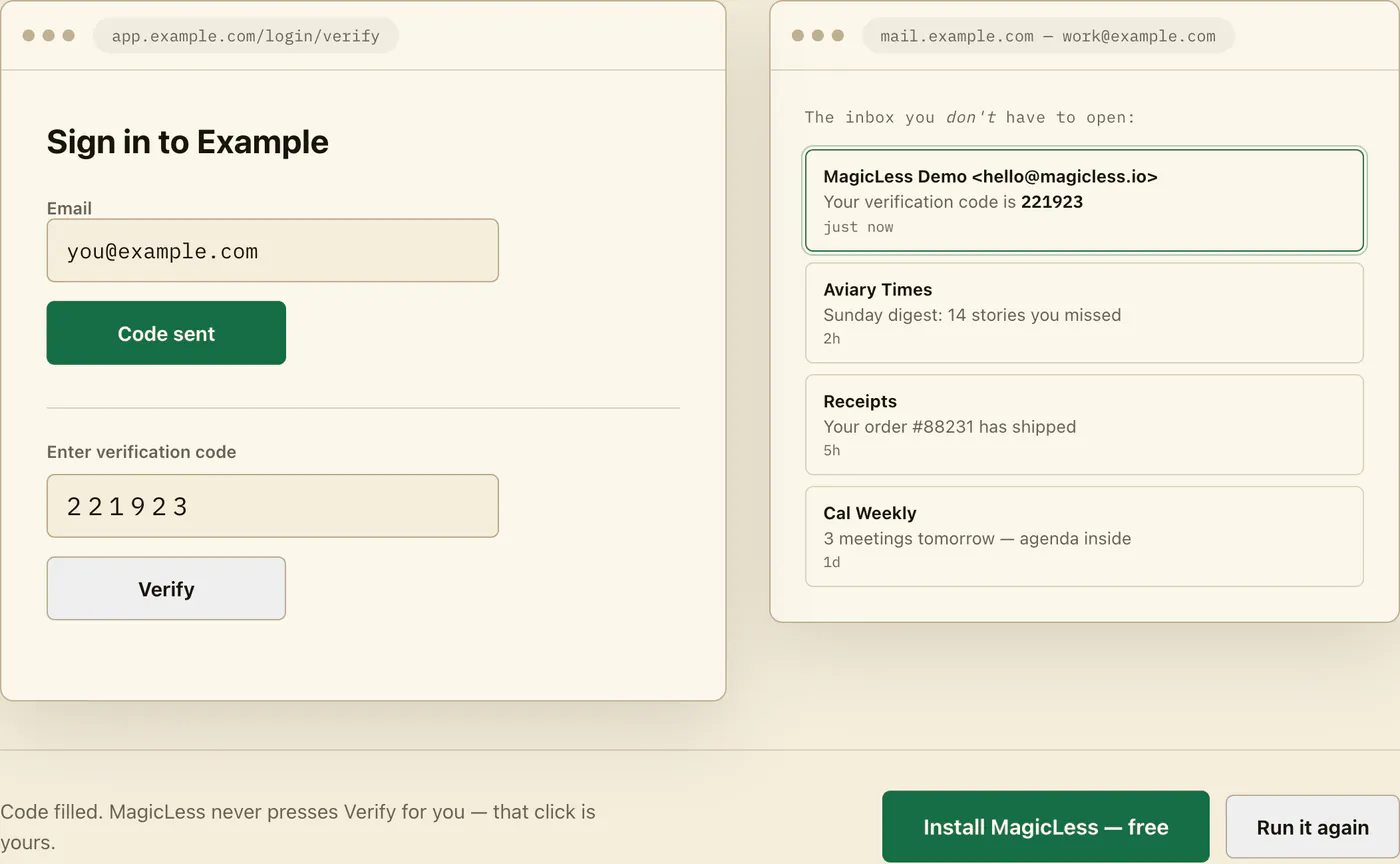
What it will not do: generate TOTP or replace your manager, work outside Chrome and connected Gmail, or auto-submit the form; you always make the final click. If you are comparing extensions in this category, use the pre-install checklist for OTP autofill extensions on MagicLess too.
FAQ
Is there a setting to make 1Password or Bitwarden fill codes from my email?
No. Both vendors document one-time-password support as generating TOTP from a secret key you save in the vault. Neither product reads your mailbox, so an emailed code is outside their documented capability.
Should I switch every site from email codes to an authenticator app?
Switch every site that offers the option; TOTP is fillable by your manager and does not depend on email delivery. Keep the recovery codes each site issues, since losing the TOTP secret without them can lock you out.
Is an emailed code less secure than authenticator TOTP?
They have different risk profiles: an emailed code is only as safe as access to that mailbox, while TOTP depends on protecting a stored secret. Security guidance consistently favors having a second factor at all over which specific type; do not drop MFA to avoid email friction.
Why does my phone sometimes offer to fill SMS codes but nothing offers email codes?
Operating systems added special-case handling for texted codes because SMS arrives through a system channel the OS controls. Email arrives inside an app or browser tab, so no equivalent OS hook exists; filling it requires a tool connected to the mailbox itself.
Claim ledger
| Claim | Source | Last checked | Confidence |
|---|---|---|---|
| 1Password fills one-time passwords by generating TOTP from a secret you save into an item, not by reading email | 1Password Support - One-time passwords | 2026-09-13 | High |
| Bitwarden's integrated authenticator generates TOTP from an authenticator key stored in the vault item | Bitwarden Help - Integrated authenticator | 2026-09-13 | High |
| Locally generated OTPs and codes delivered over a separate channel are distinct authenticator types with different properties | NIST SP 800-63B | 2026-09-13 | High |
| Multi-factor authentication substantially raises the difficulty of account compromise and should not be disabled for convenience | OWASP Multifactor Authentication Cheat Sheet | 2026-09-13 | High |
Sources
- 1Password Support - One-time passwords: https://support.1password.com/one-time-passwords/
- Bitwarden Help - Integrated authenticator: https://bitwarden.com/help/integrated-authenticator/
- NIST SP 800-63B - Digital Identity Guidelines: Authentication: https://pages.nist.gov/800-63-4/sp800-63b.html
- OWASP Cheat Sheet Series - Multifactor Authentication: https://cheatsheetseries.owasp.org/cheatsheets/Multifactor_Authentication_Cheat_Sheet.html